
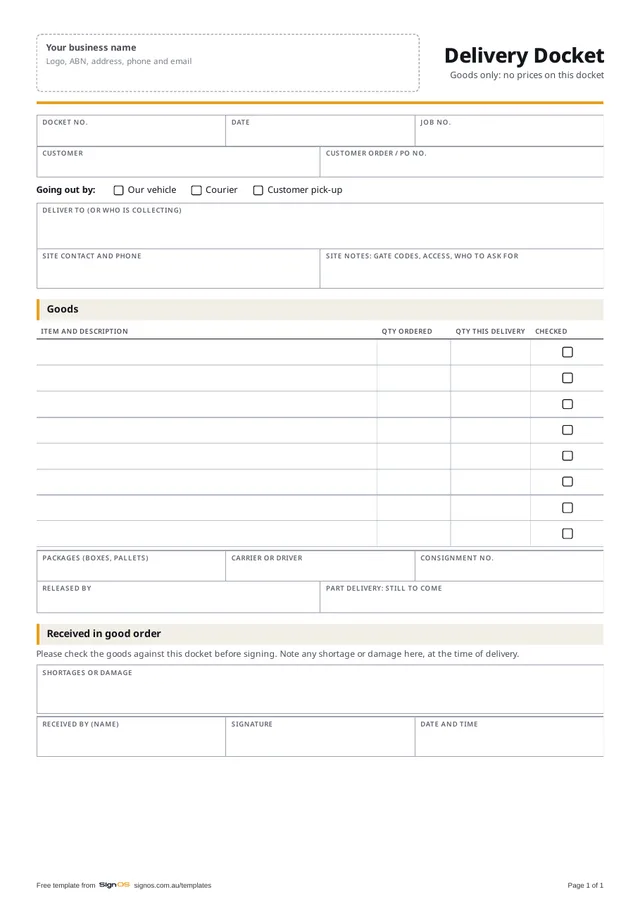
Download the free delivery docket
Free to use in your shop, no sign-up. Open the Word or Excel copy to put in your logo and your own wording; the PDF is there to print a blank one.
- Download WordAdd your logo and carriers
- Download PDFA4, 1 page, ready to print
Sign OS raises the docket from the job, tracks part deliveries, and gets it signed on screen at the door. Try it free for 30 days.
What a docket is for
The docket is the receipt for the goods, not the bill. It travels with the driver or the courier, gets checked and signed at the other end, and comes back as the record that the job left the building. Keep prices off it: the person signing for the goods doesn't need them, and your driver shouldn't be carrying them.
What to put on it
The template carries all of this, in the same order Sign OS prints its own dockets:
- Docket number, date, your job number and the customer's order number
- How it's going: your vehicle, a courier, or customer pick-up
- Where it's going, with the site contact and access notes
- Every item, with the quantity ordered and the quantity in this delivery
- Packages, carrier, consignment number and who released it
- What's still to come, on a part delivery
- Received by, signature, date and time, and any shortage or damage noted on the spot
Part deliveries and couriers
When a job goes out in parts, raise a docket per consignment and show what's still to come on each, so nobody signs for the whole job when they've received half of it. With a courier, put the consignment number on the docket and keep the courier's proof of delivery with it: their signature says a box arrived, your docket says what was in it.
Getting it signed properly
Ask the person receiving to check the goods before signing, and to write any shortage or damage on the docket there and then. A shortage noted at the door is a five-minute fix; one reported by phone a week later, against a clean signature, is an argument.
How Sign OS does this automatically
Sign OS raises the docket from the job on the Outbound board, listing each item with what's been ordered, already sent and left to send, so part deliveries are tracked as their own consignments. Your carriers and services live in Sign OS, and their signature rules print on the docket. The customer signs on screen with a finger, the signature prints into the docket's PDF, and you can email tracking to the customer after checking the email and the docket that goes with it. Dockets never carry prices.
Help: send goods out and get the docket signed →Dispatch and delivery software →Free job sign-off sheet, for installed work →
Fair questions
Should a delivery docket show prices?
No. It's the receipt for the goods, and it's read by whoever is at the door. Prices belong on the invoice.
Do I need my own docket if the courier has one?
Yes. The courier's proof of delivery says a package arrived. Your docket says what was in it, against your job, which is the part customers actually query.
What if nobody's there to sign?
Follow the courier service's signature rule: some must be signed for, some can be left. With your own vehicle, have the driver photograph the goods where they were left, note it on the docket, and tell the customer the same day.