
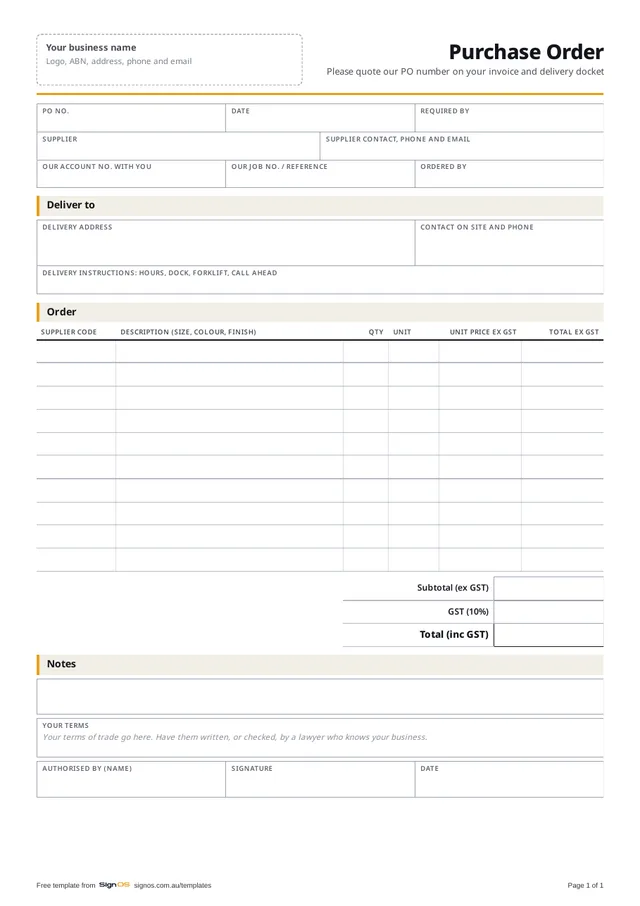
Download the free purchase order
Free to use in your shop, no sign-up. Open the Word or Excel copy to put in your logo and your own wording; the PDF is there to print a blank one.
- Download ExcelTotals and GST work themselves out, with an example
- Download WordAdd your logo and lines
- Download PDFA4, 1 page, to print a blank one
Sign OS raises POs from the job or for stock, sends the supplier a link to confirm, and receives the goods against the order. Try it free for 30 days.
What goes on a purchase order
The form has a blank box for purchasing terms, if you use them; have them written properly rather than copied off a supplier's form.
- PO number, date, and the date you need it by
- Supplier, their contact, and your account number with them
- Your job number, so the cost lands on the right job
- Deliver-to address, a site contact and delivery instructions
- The supplier's code, and a description with size, colour and finish
- Quantity in the unit you buy in: sheets, rolls, lineal metres, each
- Unit price ex GST, line totals, GST and total
- Who authorised it
Order in the supplier's units
Most ordering mistakes are unit mistakes: five of something sold in 50-metre rolls, or a sheet that's 2440 × 1220 at one supplier and 2500 × 1250 at another. Use the supplier's code, write the size and finish in full, and order in the unit they sell. If you stock in metres and buy in rolls, convert before you send the order, not after it turns up.
Deliveries and the three-way check
When the goods arrive, check them against the PO before anyone signs for more than "received, not checked". When the bill comes, check it against the PO and what actually arrived: ordered, received and invoiced are three numbers that should agree, and when they don't, the PO is what you argue from. Ask the supplier to quote your PO number on their invoice and docket; it's how the paperwork finds the job.
How Sign OS does this automatically
Sign OS raises a purchase order for a job, for stock, for consumables, for overheads or for outsourced work, and sends the supplier a branded PO. The supplier gets a private link where they confirm the order, give a ready date, mark it shipped and download the artwork, and every answer lands on the order. You receive the goods against it, close it short or split what's still coming, and match the supplier's invoice to what was ordered and received. Job POs show on the job sheet as On order, and a spending limit per person means a big order needs a second pair of eyes.
Help: raise and receive a purchase order →Help: let a supplier confirm an order without an account →Purchasing and supplier RFQ software →
Fair questions
Do I need a PO for every order?
For anything bought for a job, yes: it's how the cost finds the job and how you check the bill. Small consumables bought over the counter can go on a general order or straight to overheads.
Should the PO show prices?
Yes, the price you expect to pay. It's what you check the invoice against, and if the supplier's price has changed you want to know before the goods arrive, not when the bill does.
What if the supplier sends something different?
Note it on their docket before you sign, tell them the same day, and don't accept a substitute without an amended order. Otherwise the bill and the order will never agree.