
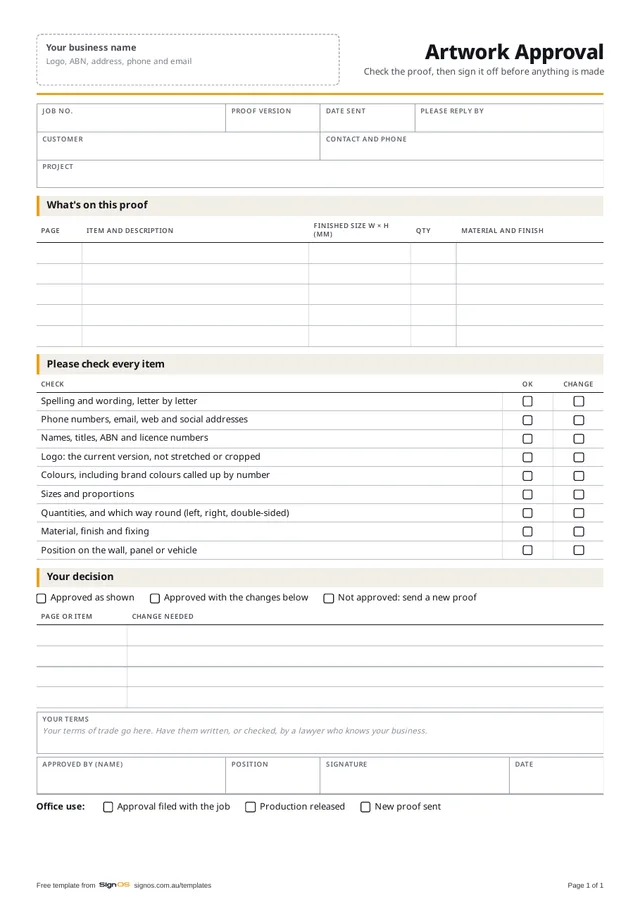
Download the free artwork approval form
Free to use in your shop, no sign-up. Open the Word or Excel copy to put in your logo and your own wording; the PDF is there to print a blank one.
- Download WordAdd your logo, change the checks
- Download PDFA4, 1 page, to send with the proof
Sign OS sends a versioned proof the customer ticks and signs in their browser, and can hold production until it's approved. Try it free for 30 days.
Why a signed proof matters
The proof is the last point where a change costs nothing. Once it's approved, production runs without anyone second-guessing the artwork, and if the customer later finds a mistake they approved, the conversation is about a reprint, not about whose fault it was. That only works if the approval is tied to a version: "approved" in an email thread with four attachments proves very little.
What the customer should check
The form walks them through it. The ones that cause reprints:
- Every word, letter by letter, and every number: phone, ABN, licence, web
- The current logo, not stretched or cropped
- Colours, with brand colours called up by number where it matters
- Sizes, quantities, and which way round on handed or double-sided signs
- Material, finish and fixing, and where it goes on the wall or vehicle
Running approvals without the ping-pong
Number every proof, v1, v2, v3, and never reuse a number. Send one proof per decision with a date you need the answer by, and make "approved with changes" mean exactly that: you make the listed changes and don't need another round. Anything more than minor gets a new version. Screen colour isn't print colour; if colour is critical, offer a printed swatch or a strike-off before the run.
The form has a blank box for your proof terms: what approval means and what happens to changes after it. Have them written or checked by a lawyer rather than borrowed off someone else's form.
Guide: getting artwork approved without the email ping-pong →
How Sign OS does this automatically
In Sign OS a proof is a versioned package tied to the exact file you sent. The customer opens it in their browser with no login, ticks and comments on each page, then approves, approves with changes or rejects, and signs with a finger or a mouse. Approve with changes doesn't release production on its own: someone reads the notes and releases it, and that's recorded against their name. A new version supersedes the old link, so an approval on v1 can never be applied to v2, and a proof marked as needing approval holds production until it's signed.
Help: get artwork approved by the customer →Artwork proofing and approval software →
Fair questions
Is an email reply good enough as approval?
Better than nothing, but only if it clearly refers to one version of the proof. "Looks good" in reply to a thread with three attachments isn't. A signed form, or an online approval tied to the version, is.
What if the customer approves a mistake?
Then the proof did its job: the signed approval is your record of what they agreed. Most shops reprint at cost or for a fee, and add the miss to the checklist so it gets caught next time.
Does every job need a proof?
Anything with the customer's artwork, wording or a custom layout, yes. A stock sign, or a reprint of an approved file, can skip it if the job sheet says which approved version it's printed from.