
Job sheet template: the work order that travels with the job
Published 29 October 2026
The job sheet (some shops call it a work order, job ticket or job card) turns a sold quote into instructions the workshop can follow without asking anyone. It goes with the work from prepress to dispatch. Download the free template below, as an Excel file to fill in on screen or a PDF to print, and see what a good one carries.
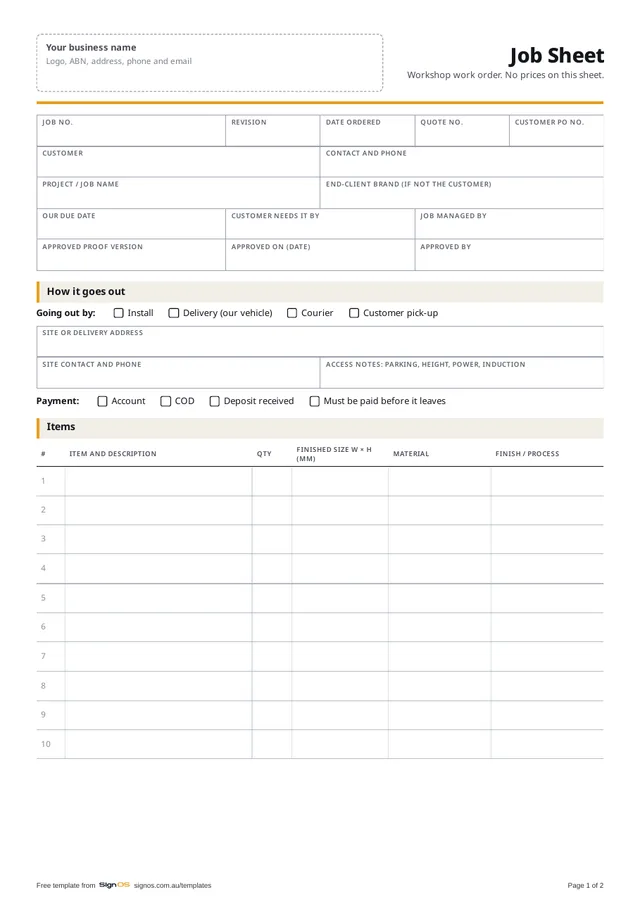
Download the free job sheet / work order
Free to use in your shop, no sign-up. Open the Word or Excel copy to put in your logo and your own wording; the PDF is there to print a blank one.
- Download ExcelFill in on screen, with a worked example
- Download PDFA4, 2 pages, ready to print
Sign OS builds the job sheet from the job, with a QR code on every step for the floor to scan. Try it free for 30 days.
What the job sheet is for
The quote is written for the customer. The job sheet is written for the person at the router at 7am who wasn't in the sales meeting. It says what to make, how many, what size, out of what, by when, and how it leaves the building. If they have to walk to the office to ask, the sheet failed.
A good job sheet also keeps prices off the floor. The workshop needs quantities and materials, not what the customer paid, so the job sheet never carries a sell price.
When to raise it
Raise it when the customer accepts the quote, and release it to the workshop when the artwork is approved. A sheet worked from an unapproved proof is how a whole run of panels gets made in last month's colours. If you have to start early, say to order long-lead materials, mark the sheet clearly as waiting on proof.
- Raise it when the quote is accepted
- Hold production until the proof is approved, and write down which version
- Reprint it whenever anything changes, with a new revision number, and bin the old copy
- One sheet per job with every item on it, even when items go to different departments
What to include on a job sheet
The template carries everything below. Cross out what you don't use rather than leaving people to guess whether a blank means "not needed" or "forgot".
- Job number, revision, date ordered, quote number and the customer's PO number
- Customer, contact and phone, and the end-client brand when you're working for an agency
- Your due date and the date the customer actually needs it, which are often different
- How it goes out: install, delivery, courier or pick-up, with the site address, site contact and access notes
- Payment: account or COD, and whether it has to be paid before it leaves
- Every item with quantity, finished size, material and finish
- The approved proof version, when and who approved it
- Materials: what to pull from stock and what's on order, with the PO number
- Production steps by department, with an estimated time, and initials and a date as each is done
- A final quality check before dispatch, signed by someone who didn't make it
- Extra time or materials used, so the job can be costed back
Making the job sheet work on the floor
Write sizes in millimetres, width before height, every time, and say whether it's the finished size or the material size. "1200 x 600" on a sheet where one person reads it as the panel and another as the visible area is a remake waiting to happen.
Keep notes specific. "Match existing" means nothing to someone who hasn't seen the existing sign; "match existing blue, PMS 286 C" does. And if a customer said something that matters to them, like the logo centred on the door rather than the window, it belongs on the sheet, not in the salesperson's head.
- One job, one sheet, in a sleeve or job bag with the printed proof
- Initial each step as it's done, so anyone can see where the job is up to
- Write extra time or material on the sheet as it happens, not from memory on Friday
- Quality check against the approved proof, not just against the job sheet
How Sign OS does this automatically
In Sign OS the job sheet is built from the job, so it is never out of date with it. It carries the quote, due and client-required dates, the site and how the job goes out, then every line with its size, quantity, specifications and each department's steps. Lay it out by department or by sign, or print the Job card layout with a front page and a page per sign for big orders. Materials print as quantities, never costs, and a product's storage location prints so the picker knows which shelf to walk to.
Every production step prints with its own QR code. The floor scans it to start or finish the step, and the boards and the timeline update without anyone typing. A proof that needs approval holds the job until the customer signs it off in their browser, and when the job changes the sheet is reprinted with its revision number, so the old copy is easy to spot.
Frequently asked questions
- What's the difference between a job sheet and a work order?
- In most sign shops, nothing. Job sheet, work order, job ticket, job card and traveler all mean the paper that goes with the job through the workshop. Some shops use "work order" for the whole job and "job card" for a page per item; this template works either way.
- Should the job sheet show prices?
- No. The floor needs to know what to make, not what it sold for. Prices on a job sheet end up on the bench, in the ute and in front of the customer. Keep money on the quote and the invoice.
- Excel or paper?
- Both. Fill in the Excel version on screen so it's legible and easy to reprint, then print it to go with the job. Ticks and initials on the floor are quicker on paper. The Excel file has a filled-in example tab to show what goes where.
- How many job sheets should one job have?
- One, with every item on it. When items go through different departments, list them all on the one sheet and let each department work its own steps. Several sheets for one job is how an item gets forgotten.