
Risk assessment form: a blank 5×5 template, and how to fill it in
Published 29 October 2026
A risk assessment is where you work out what could hurt someone on a job, how likely and how bad it would be, and what you'll do about it. This one is blank on purpose: you know your shop, your gear and your sites, and the assessment has to be yours. Download it below and use the guide on this page to fill it in. None of the guide is in the form.
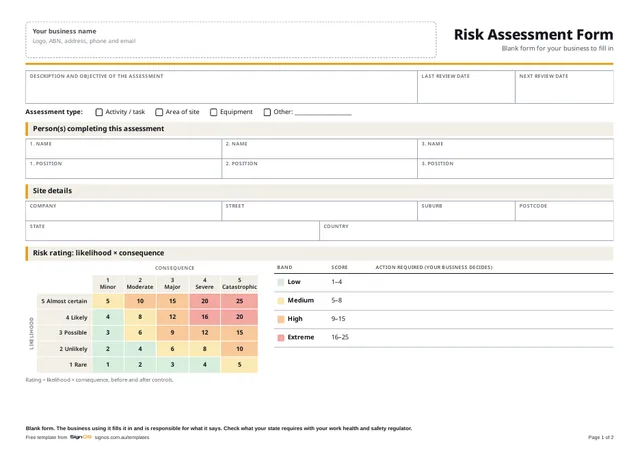
Download the free risk assessment form
Free to use in your shop, no sign-up. Open the Word or Excel copy to put in your logo and your own wording; the PDF is there to print a blank one.
This is a blank form. Nothing on it is filled in for you: your business writes the hazards, ratings and controls, and is responsible for what it says. The guide on this page is for reading beside it; none of it is in the file. Check what your state requires with your safety regulator.
- Download WordAdd rows, your logo and your own actions
- Download ExcelDropdowns, and the rating works itself out
- Download PDFA4 landscape, 2 pages, ready to print
On Scale and above, Sign OS keeps a risk register on the same 5×5 matrix, with an owner and review reminders for each risk. Try it free for 30 days.
How to fill it in
Do it with the people who do the work. They know where the near misses happen, and an assessment written in the office for someone else's task tends to miss the thing that actually goes wrong.
- Say exactly what you're assessing: one task, one area or one machine. "The workshop" is too big to assess well.
- Tick the assessment type, and set a next review date you'll actually keep.
- Put each hazard on its own line, with how it could cause injury, illness or damage.
- Rate it as things stand now: likelihood, then consequence.
- Write the controls, then rate it again as it would be with them in place. That's the residual rating.
- Give every control a person and a date, or it won't happen.
- Have someone who didn't write it review it and sign it off.
How to rate a risk
Rating = likelihood × consequence, each scored 1 to 5, so every risk lands somewhere from 1 to 25. Likelihood runs Rare, Unlikely, Possible, Likely, Almost certain. Consequence runs Minor, Moderate, Major, Severe, Catastrophic. Rate the most credible bad outcome, not the worst thing you can imagine, then how likely that outcome is.
The grid on the form colours the scores into four bands: Low 1–4, Medium 5–8, High 9–15 and Extreme 16–25. The action for each band is left blank because it's your call. Decide it once, write it on the form, and hold to it every time. For each band, decide:
- Low (1–4): can the person doing the job accept it, and when is it looked at again?
- Medium (5–8): who signs off the controls, and how soon do they have to be in place?
- High (9–15): does the work wait until the controls are in place, and who checks them?
- Extreme (16–25): can the work go ahead at all, and who has the authority to say so?
- Any band: who needs to be told, and does it go on your risk register?
Choosing controls: the hierarchy
Safe Work Australia's model code of practice, How to manage work health and safety risks, sets out the hierarchy of control measures. Start at the top: eliminate the hazard if you can. If you can't, reduce the risk by substituting something safer, isolating people from the hazard, or using engineering controls. Then use administrative controls, and personal protective equipment last. Admin controls and PPE rely on people getting it right every time, so they back up the higher controls rather than replace them, and a control shouldn't bring in a new hazard of its own.
Victoria runs its own OHS Act 2004 and OHS Regulations 2017 rather than the model WHS laws. For construction work, regulation 325 sets the same order: eliminate the risk so far as is reasonably practicable, then substitute, isolate or use engineering controls, then administrative controls, and PPE last.
On site: things sign shops usually think about
Prompts, not answers. Nothing here has a rating or a control, because whether it applies, how likely it is and what you do about it depends on your job and your site.
- Working at height, and how you get there: EWPs, ladders, scaffold
- Overhead power lines near the work or the lift
- Traffic, pedestrians and the public around the work area
- Roofs, skylights and fragile surfaces
- Working alone, or out of phone contact
In the workshop: things sign shops usually think about
The same rule: prompts to check against your own shop, with no ratings or controls attached.
- Routers and CNC machines
- Lasers, and the fumes they make
- Solvent and UV inks
- Laminator nip points
- Heat guns
- Lifting and handling sheets and panels
- Blades and knives
Who to ask
Safe Work Australia writes the national model laws and codes of practice but doesn't enforce them. Your state or territory regulator does, and its site has the rules that apply where you work. Victoria is the one jurisdiction that hasn't adopted the model WHS laws, so Victorian shops go to WorkSafe Victoria.
- Safe Work Australia: national model laws, codes and guidance
- SafeWork NSW (New South Wales)
- WorkSafe Victoria (Victoria)
- Workplace Health and Safety Queensland (Queensland)
- SafeWork SA (South Australia)
- WorkSafe WA (Western Australia)
- WorkSafe Tasmania (Tasmania)
- NT WorkSafe (Northern Territory)
- WorkSafe ACT (Australian Capital Territory)
How Sign OS helps
On Scale and above, Sign OS keeps a risk register on the same 5×5 matrix: who identified and assessed each risk and how, the controls in place and the ones still to do, an owner and a review date. The owner is reminded two weeks before the review is due, on the day, and weekly while it's overdue. A job's SWMS can link to those risks. Your responsible person still reviews the hazards and controls: the software keeps the record, it doesn't make the call.
Frequently asked questions
- Is a risk assessment the same as a SWMS?
- No. A risk assessment can cover any task, area or piece of equipment, in the workshop or on site. A SWMS is required for high-risk construction work, such as work where someone could fall more than 2 metres, and has its own required content. Plenty of shops do the risk assessment first and carry what they learn into the SWMS.
- How often should it be reviewed?
- Set a next review date when you do it, and review it sooner when the task, the equipment or the site changes, after an incident or a near miss, or when a control isn't working. Check whether your regulator expects more for the kind of work you do.
- Does the Excel version work out the rating?
- Yes. Pick likelihood and consequence from the dropdowns and it multiplies them and shows the band, before and after controls. It's arithmetic only: it doesn't suggest hazards, ratings or controls.
- Can I fill it in and file it as it is?
- It's blank so that it's yours. Your business is responsible for what goes on it, so fill it in with the people doing the work, and check your state's requirements with your regulator.