
Sign installation checklist: before, on site and sign-off
Published 29 October 2026
Most install call-backs start back at the shop: a missing bracket, the wrong fixings, nobody told the site contact you were coming. This checklist covers the whole install in four parts: before you leave the shop, the site check when you arrive, the install itself, and the sign-off. Download the free template below and adapt it to the work you do.
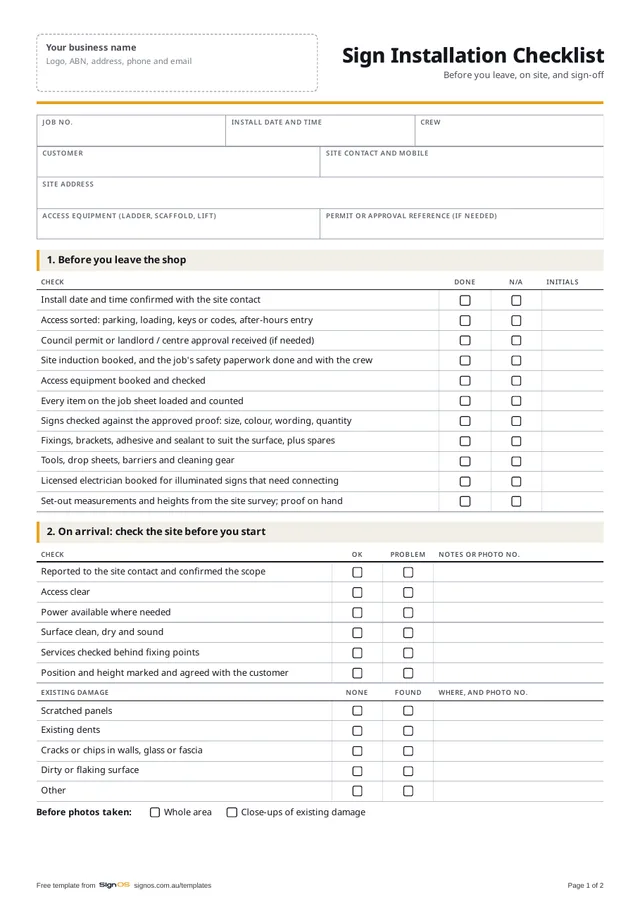
Download the free sign installation checklist
Free to use in your shop, no sign-up. Open the Word or Excel copy to put in your logo and your own wording; the PDF is there to print a blank one.
- Download WordAdd your own checks and logo
- Download PDFA4, 2 pages, ready to print
Sign OS puts your install checks on every job, and crews tick the site check and send photos from their phones. Try it free for 30 days.
Why installs need a checklist
An install is the most expensive hour in a sign job: two people, a vehicle, maybe a hired lift, and a customer waiting. A forgotten fixing kit or a site you can't get into turns that hour into a second trip you can't charge for. A checklist doesn't make good installers better. It stops the same three mistakes happening on a busy day.
It also records the site as you found it. Notes and photos of existing damage before you start are what protect you when a cracked tile or a scratched shopfront gets blamed on the install.
Before you leave the shop
Most of an install goes right or wrong before the van leaves. Whoever loads the vehicle should work through this part with the job sheet in hand.
- Install date and time confirmed with the site contact, with their mobile number
- Access sorted: parking, loading zone, keys or codes, after-hours entry
- Council permit or landlord / centre approval in hand, if the job needs one
- Site induction booked, and your shop's safety paperwork for the job done and with the crew
- Ladders, scaffold or a lift booked and checked
- Every item on the job sheet loaded and counted
- Signs checked against the approved proof: size, colour, wording and quantity
- Fixings, brackets, adhesive and sealant for the surface you're fixing to, plus spares
- A licensed electrician booked for illuminated signs that need connecting
- Set-out measurements and heights from the site survey, and the proof on your phone
On arrival: check the site before you touch it
Before a drill comes out, walk the site with the contact and photograph it. Note anything already scratched, dented, cracked or dirty, and confirm the position on the wall, not on the drawing. Five minutes here is the cheapest insurance in the trade.
- Report to the site contact and confirm the scope
- Photos of the whole area, and close-ups of any existing damage
- Surface checked: clean, dry, sound and right for the fixings
- Access clear, and power available where you need it
- Services checked behind fixing points
- Position and height marked and agreed with the customer before fixing
During the install and at sign-off
Finish the job the way you'd want to find it. The customer remembers the mess and the missed light long after they've forgotten how straight the letters are.
- Work area kept clear of the public
- Level and position checked before the final fixing
- Penetrations sealed on external walls
- Protective film removed and the signs cleaned
- Illuminated signs tested, timers set, and the customer shown the switch
- Site cleaned: packaging, offcuts and dust gone
- Finished photos: straight on, plus a wide shot with context
- Walk-through with the customer and the job sign-off sheet signed
- Extra time, materials or variations written down for the office
How Sign OS does this automatically
Sign OS copies your install tasks onto every new job's Dispatch tab, things like booking the install date, confirming site access and equipment, and permits or induction, so the same checks happen on every job and you can see which are done. Council permits sit on the job with their reference and expiry, and you're reminded before one lapses. Installs are scheduled on the same timeline as production.
On site, crews use the installer portal. They tick your condition checklist (scratched panels, existing dents, dirty surface, access clear, power available, or your own list), take photos tagged before, existing damage, in progress and finished, and add notes. It works without signal and syncs when they're back in range, and contractors only see the jobs you give them, with no prices. The condition log and photos download as one evidence pack, and the job's docket can be signed on screen at handover.
Frequently asked questions
- Do I need a different checklist for vehicle wraps?
- The before-and-after parts are the same: photograph the vehicle all round and note existing chips, dents and rust before you start. Swap the fixing and access checks for surface prep: wash, degrease, temperature and drying time. The Word version is editable for exactly this.
- Who fills in the checklist?
- Part one can be done by whoever loads the vehicle. The rest is the installer on site, not the office. Initials beside each tick make it clear who checked what.
- Should I photograph every install?
- Yes, before and after, every time. It takes two minutes and it's the best record you'll ever have of what was there before you arrived and how you left it. Name or tag the photos with the job number so they can be found again.
- Is this a safety document?
- No. It's an operational checklist for getting the install right. It doesn't replace the safety paperwork your shop uses for work at height, electrical work or other high-risk jobs.