
Job sign-off sheet: get the work accepted before you leave site
Published 29 October 2026
A job sign-off sheet is the one page that says the customer looked at the finished work and accepted it. For a sign shop it closes the install, lets the office invoice the balance, and settles the argument three weeks later about whether the third panel went up straight. Download the free template below, then read how to use it so it actually does that job.
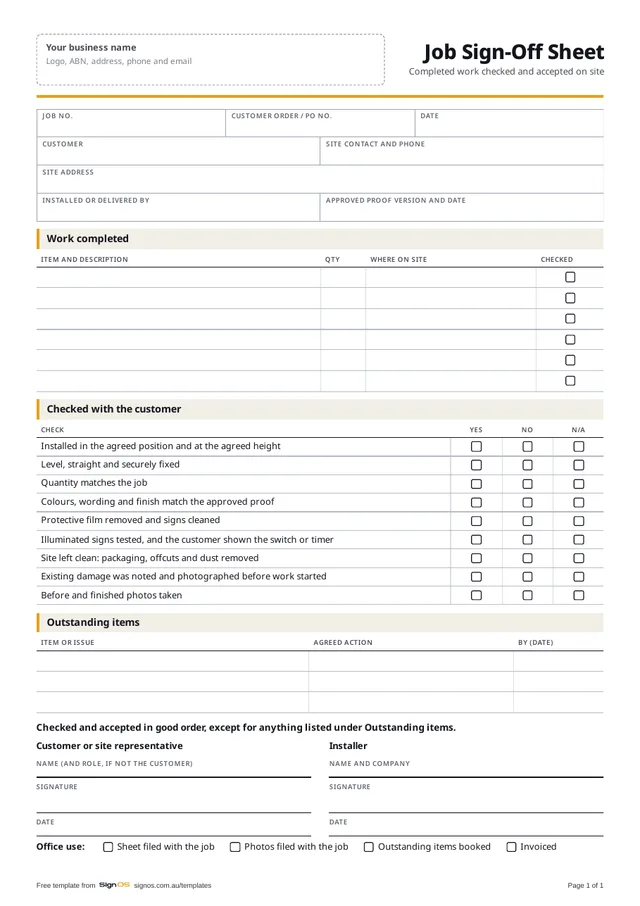
Download the free job sign-off sheet
Free to use in your shop, no sign-up. Open the Word or Excel copy to put in your logo and your own wording; the PDF is there to print a blank one.
- Download WordAdd your logo, change the checks
- Download PDFA4, 1 page, ready to print
Sign OS builds the docket from the job, and the customer signs it on screen at handover. Try it free for 30 days.
What a job sign-off sheet is for
Most signage disputes aren't about the sign. They're about what was agreed: the position, the height, the colour, whether the old sign was meant to come down. Once the crew has packed up and gone, it's your word against the customer's memory. A sign-off sheet records the customer's agreement while they're standing in front of the work and can see it.
It also gives the job a clean finish. The installer knows they're done, the office knows it can invoice, and anything still outstanding is written down with an agreed next step instead of turning up as a complaint when the invoice lands.
When to use it
Use it on every install, and on any collection or delivery where the customer inspects the work in front of you. A delivery docket proves the goods arrived; a sign-off sheet proves the work was accepted, which is the thing that matters on installed work.
- At the end of every install, before the crew leaves site
- On handover of a vehicle wrap or fleet graphics, with the vehicle in front of you
- When one stage of a bigger project is finished and the next depends on it
- If the customer isn't there, have the site contact or centre manager sign, and write their role
- If nobody can sign, take finished photos, email them the same day and note it on the sheet
What to include on a sign-off sheet
Keep it to one page. The job number ties it back to the quote, the proof and the job sheet. Everything else is there so the customer can check the work against what they approved, and so you can find the sheet again in a year.
- Job number, the customer's order or PO number, and the date
- Customer, site address, and the site contact who is signing
- Each item installed or handed over, with its quantity and where it went on site
- The proof version it was made from, so "that's not what I approved" has an answer
- A short checklist: agreed position and height, level and secure, quantity right, colours and wording match the proof, film removed, lights tested, site left clean
- Anything outstanding, with the agreed action and a date
- Before and finished photos taken
- Customer name, signature and date, and the installer's name, signature and date
How to get it signed without making it awkward
Walk the job with the customer before you hand over the pen. Point out the things they asked for: the height they marked, the colour they picked, the light that's now on a timer. People sign happily when they've just been shown that what they asked for is what they got.
Never write "nil" under outstanding items to get a signature. If a panel is scratched or a light is out, write it down with what you'll do and when. A sign-off that lists one honest defect is worth far more than one that pretends there were none, and it stops a small fix becoming the reason the whole invoice sits unpaid.
- Take the finished photos before the walk-through, not after
- Get the name printed as well as signed, and their role if they're not the customer
- Leave a copy on site, or email a photo of the signed sheet the same day
- File it against the job number, not in the glovebox of the ute
How Sign OS does this automatically
In Sign OS the paperwork comes off the job, so nobody retypes it on site. Collections, deliveries and installs go out from the Outbound board with a docket that lists exactly what is leaving, part deliveries included. The customer signs for it on screen with a finger, the signature prints into the docket's PDF and the job moves to Dispatched. If they'd rather sign paper, the printed docket has a signature block.
Install crews on the installer portal tick your condition checklist and take photos tagged before, existing damage, in progress or finished, with notes, and it all lands on the job, even from a site with no signal. One button builds an evidence pack of the condition log and photo record to hand a customer or insurer. You can also put a "Confirm client sign-off" task on the checklist every new job starts with, so no job closes without one.
Frequently asked questions
- Is a job sign-off sheet the same as a delivery docket?
- Close, but not quite. A delivery docket says the goods arrived in the quantities listed. A sign-off sheet goes further for installed work: the customer confirms the position, finish and condition of what went up. On a supply-only job a signed docket is usually enough; on an install, use the sign-off sheet as well.
- What if the customer won't sign?
- Don't argue on site. Write "customer declined to sign" with the time, take finished photos, and email them with the sheet the same day, asking them to reply with anything they're not happy with. A dated email with photos is the next best record.
- Who should sign if the customer isn't there?
- Whoever is responsible for the site on the day: a store manager, site supervisor or centre manager. Print their name and role. Even if they can't accept the work for the customer, the sheet still records what was installed and the condition it was left in.
- Can I put my own logo on it?
- Yes. The Word version is fully editable: add your logo and business details in the header and change the checklist to suit the work you do. The PDF is ready to print as it is, with a space at the top to write or stamp your business name.