
Deal with late jobs and jobs waiting on someone
Which jobs are late or stuck, and what do I do about each one?
- For
- Production managers and project managers
- Where to find it
- SidebarProductionThe late and on hold count
- Takes
- 5 minutes each morning
- You need
- A login that can see the production schedule
What it is for
This is the list of jobs that need a decision. Late shows what is past its date or won't make it in the order things stand. On hold and waiting shows what has been stopped or taken off a list. Each job says where it is up to and has the buttons to do something about it.
After this you can
- See every late job, by the department it is sitting in
- See what is on hold or waiting on someone, and for how long
- Mark a job urgent, take it off a list or leave a note without leaving the page
- Jump to the job on the board
The Late and on hold screen
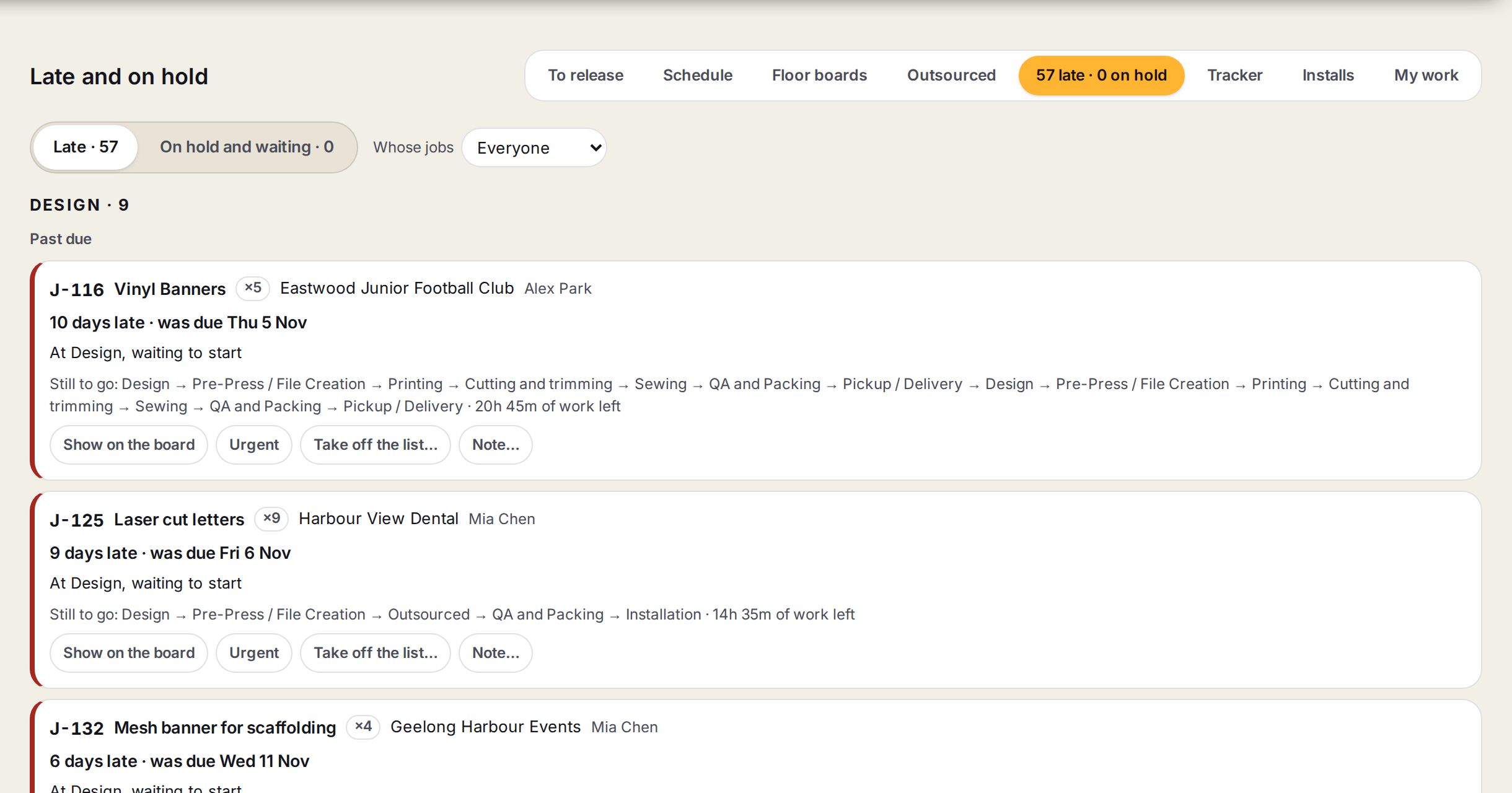
- 1Late, and On hold and waitingThe two lists, each with its count. The same two counts show on Production's tabs.
- 2Whose jobsEveryone's, or one job owner's.
- 3A departmentJobs are grouped by the department they are sitting in, with how many.
- 4Show on the boardOpens the planner with that job in view.
- 5Urgent, Take off the list and NoteMove it to the top, say it is waiting on someone, or leave a note for the floor.
Working the list each morning
- 1
Open it
Go to Production and press the count that reads late and on hold, beside Outsourced.
- 2
Start with Past due
Under each department, Past due jobs come first. Each says how late it is, where it is sitting and how much work is left.
- 3
Decide
Press Urgent to move it to the top, or Show on the board to move work around it.
- 4
Say why it is stuck
If it is waiting on someone else, press Take off the list… and say what for.
- 5
Check what is waiting
Press On hold and waiting to see what has been stopped, what each is waiting on and for how long. Press Back on the list when it can go again.
Words on this screen
Past due
The date has gone and the job is not finished.
Won't make it at the current order
Not late yet, but the plan has it finishing after its date unless something moves.
On hold
The job itself has been stopped, for example for an unpaid deposit.
Waiting
A step has been taken off its department's list while it waits on someone else.
Tips
Leave a note with Note… when you ring the customer, so the floor knows what was said.
A job that won't make it is the cheapest one to save. Deal with those before they become past due.
Watch out
Urgent on one job pushes every other job back. If everything is urgent, nothing is.
Taking a job off a list stops it being planned. It will not finish until someone puts it back.
The counts are for the whole shop unless you pick a person under Whose jobs.