
Get delivery prices on a quote
How do I find out what delivery will cost and add it to the quote?
- For
- Estimators
- Where to find it
- SidebarQuotesopen a quoteWhen & whereChange
- Takes
- A minute
- You need
- A quote set to Delivery with an address
What it is for
The quote boxes the order and works out the weight the courier charges on. From there you type a price, use your weight band, or ask your couriers and pick one.
After this you can
- Read what the parcel is and what it will be charged as
- See which lines could not be boxed and why
- Put a delivery price on the quote
Before you start
- Boxes and sign weights are set up.
- For courier prices, at least one courier is connected. For band prices, your weight bands are set.
Step by step
- 1
Set the quote to Delivery
On the quote, press Change beside When & where. Choose Delivery and enter the address.
- 2
Check The parcel
The parcel shows the boxes, the charged weight and where it is going. Lines that cannot be packed are listed with the reason.
QuotesQ-330When & where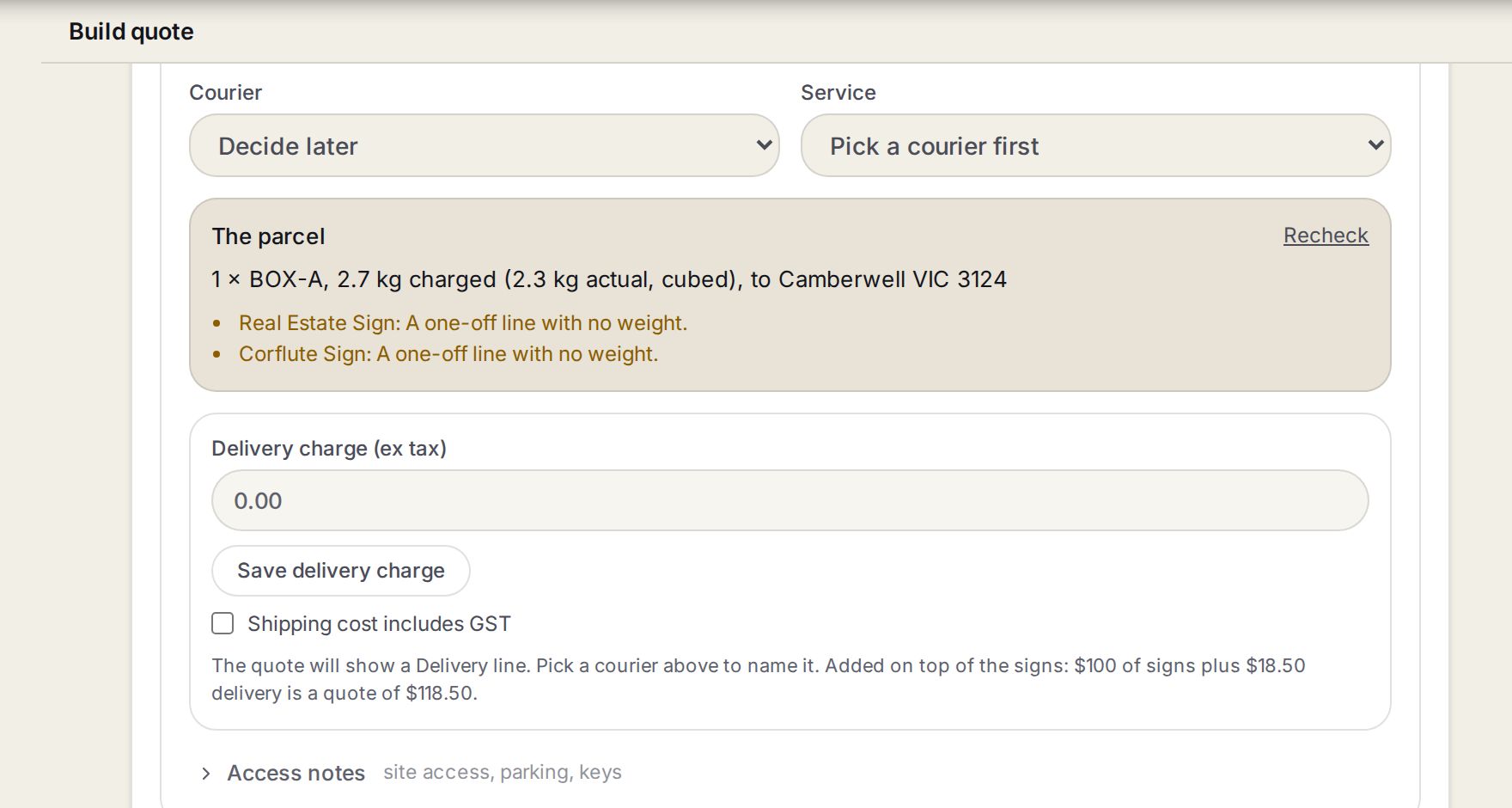
- 1Courier and ServiceNames the courier on the Delivery line. Decide later is fine while you are still pricing.
- 2The parcelThe boxes, the charged weight and the suburb. Under it, each line that could not be boxed and why.
- 3RecheckWorks the parcel out again after you change a line, a box or the address.
- 4Delivery charge and Save delivery chargeThe price, ex tax. Nothing is on the quote until you press Save delivery charge.
- 3
Get a price
Type the charge yourself, press Use this price on your weight band, or press Get delivery prices to ask your connected couriers and press Use on the one you want.
- 4
Save it
Check the delivery charge and press Save delivery charge.
With a courier connected
These appear under The parcel once at least one courier is connected.
| What you see | What it means |
|---|---|
| Get delivery prices | Asks every connected courier at once. One that does not answer in 8 seconds says so, and the others still show. |
| courier $… · you charge $… ex | What the courier charges you, and your price with your markup. |
| Use | Fills the delivery charge with your price and sets the quote's courier. |
| Ask again | Asks the couriers again, for after a change. |
| Priced before the order changed | Lines, boxes or the address changed after a price was picked. The charge has not moved. Get the prices again to check it. |
Words on this screen
Charged weight
The heavier of the real weight and what the box's size is charged as.
Cubed
The box's size was heavier than what is in it, so the size is what gets charged.
One-off line
A line typed by hand, not picked from your products. It has no weight, so it cannot be boxed.
Tips
A typed delivery charge always wins, so you can quote by hand while a courier is down.
Customer pays the courier themselves? The courier prices are hidden, because there is nothing to charge.
Watch out
The quote never re-prices itself. A sent quote keeps the price it went out with.
A price from a band or a courier only covers the lines that were boxed. Check the list under The parcel before you use it.
Common questions
It says nothing can be boxed yet. Why?
Every line is a one-off line, or a sign with no weight or packed thickness. Give the product a weight, or type the charge.
It says a sign is too big for every box. What now?
Add a box it fits in under Shipping & delivery in Settings, or type the charge for that one.