
Connect a courier
How do I get my own courier account's prices inside a quote?
- For
- Admins
- Where to find it
- SidebarSettingsShipping & deliveryConnect your couriers
- Takes
- 5 minutes once you have the login
- You need
- An account with the courier and its API login
What it is for
A connected courier answers "what will this parcel cost?" from inside a quote, at your own account's prices. Your login is stored encrypted and only used to ask the courier.
After this you can
- Connect a courier account
- Try it in the courier's sandbox first
- Link it to the courier name your quotes and dockets use
Before you start
- Your dispatch address is set (Set where your parcels leave from).
What is on this screen
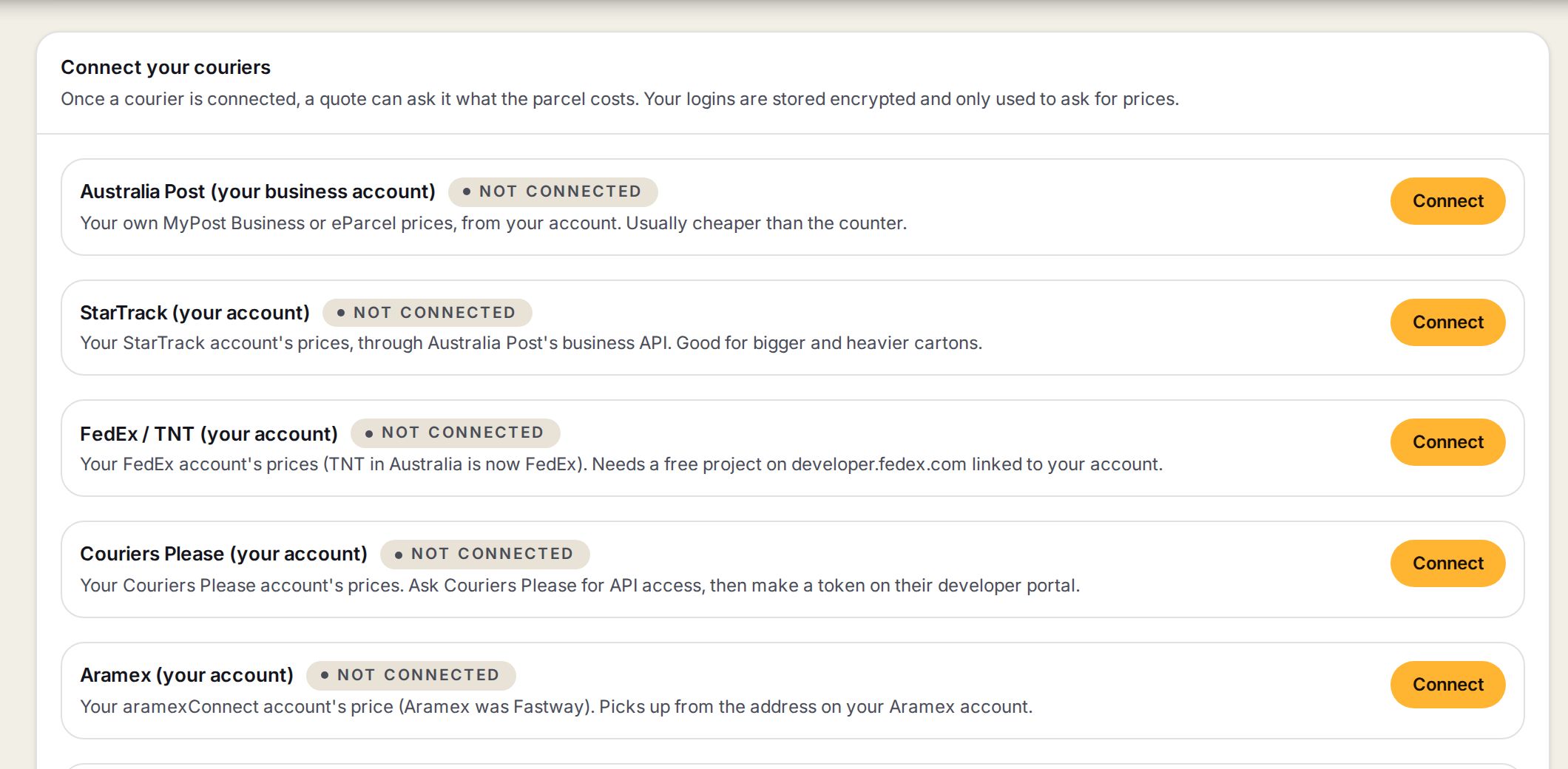
- 1A courier's cardThe courier, whether it is connected, and what you get from it.
- 2ConnectOpens that courier's login form. Once connected it reads Change.
Step by step
- 1
Find Connect your couriers
Go to Settings, then Shipping & delivery, and scroll to Connect your couriers.
- 2
Press Connect on the courier
Press Connect on the courier's card. Pick Sandbox or Live where offered, paste the login, and pick which of your couriers it Shows on quotes as.
SettingsShipping & deliveryConnect your couriersConnect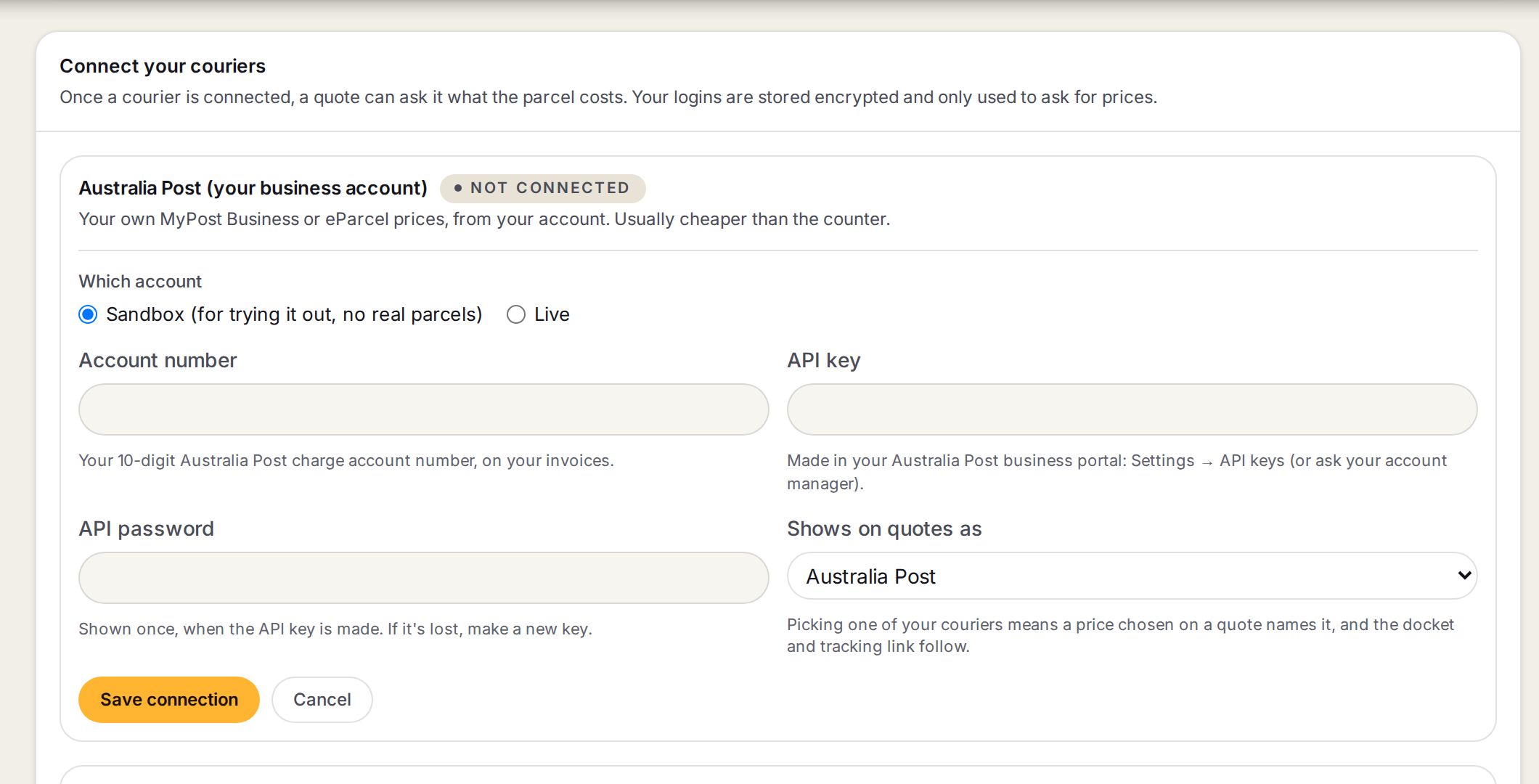
- 1Sandbox or LiveA sandbox lets you try everything with no real parcel. Use the matching login for each.
- 2The loginWhat this courier asks for. The line under each box says where to find it.
- 3Shows on quotes asLinks the connection to one of your couriers, so a price picked on a quote names it and the docket and tracking link follow.
- 4Save connectionStores the login encrypted.
- 3
Save and test
Press Save connection, then Test connection. It asks for a small Melbourne to Sydney parcel and says Connected, or what went wrong in words.
- 4
Done
The card says Connected and shows the last four characters of the login.
What each courier needs
Each card lists its own boxes. This is where the login comes from.
| Courier | What to paste | Where to get it |
|---|---|---|
| Australia Post (your business account) | Account number, API key, API password | Your Australia Post business portal, or your account manager. |
| StarTrack (your account) | The same kind of key, with your StarTrack account number | Through Australia Post's business portal. |
| FedEx / TNT (your account) | API key, secret key, account number | A free project on developer.fedex.com linked to your account. TNT in Australia is now FedEx. |
| Couriers Please (your account) | Developer ID and token | Ask Couriers Please for API access, then make a token on their developer portal. Sandbox and live have separate tokens. |
| Aramex (your account) | Client ID and secret | aramexConnect, Administration, API. |
| Direct Freight Express (your account) | Pricing and consignment keys, 5-digit account number, site ID | Direct Freight portal, Developer Centre. |
| Border Express (your account) | Client ID, secret, account code | Email Border Express to switch on API access. Live only: there is no test area. |
| Australia Post (counter prices) | One free key | developers.auspost.com.au. No account needed. |
| Sendle | Sendle ID and API key | sendle.com, Settings, Integrations. |
| Transdirect | One API key | Your Transdirect account. Gives prices from several couriers. |
Words on this screen
API login
A key the courier gives you so software can ask for prices on your account. It is not your website password.
Sandbox
The courier's practice area. Nothing is picked up and nothing is charged.
Tips
To change which courier a connection is linked to without retyping the secret, press Change and leave the secret box blank.
Last questions asked of your couriers, under the cards, lists every price check and test, so a courier that is slow or refusing is easy to spot.
Watch out
A sandbox login on Live, or the other way round, is the usual reason a test fails. The card says why.
Aramex picks up from the address on your Aramex account, not your dispatch address here.
Direct Freight gives prices now. Booking stays off until Sign OS has been checked against Direct Freight's own guide.
Common questions
Is my login safe?
It is stored encrypted. After saving, only its last four characters show, and it is only used to ask the courier.
My courier is not on the list. What then?
Price from your own weight bands, book on the courier's website, and type the consignment number on the docket.
How do I take a courier off?
Press Disconnect on its card.