
Set up your boxes and material weights
How does Sign OS know which box an order goes in and what it weighs?
- For
- Admins
- Where to find it
- SidebarSettingsShipping & delivery
- Takes
- 10 minutes with a tape measure
- You need
- The Scale or Signature plan, which include Shipping & couriers
What it is for
Couriers charge on the bigger of what a parcel weighs and how much room it takes up. Sign OS can only work that out if it knows your boxes and what your signs weigh. You enter both once, here.
After this you can
- Add each carton, tube and satchel you post in
- Tell Sign OS what your sheet materials weigh
- Read the weight a courier will charge for each box
Before you start
- Measure each box inside and out, and weigh one empty.
What is on this screen
Point at a number in the list and it lights up on the picture.
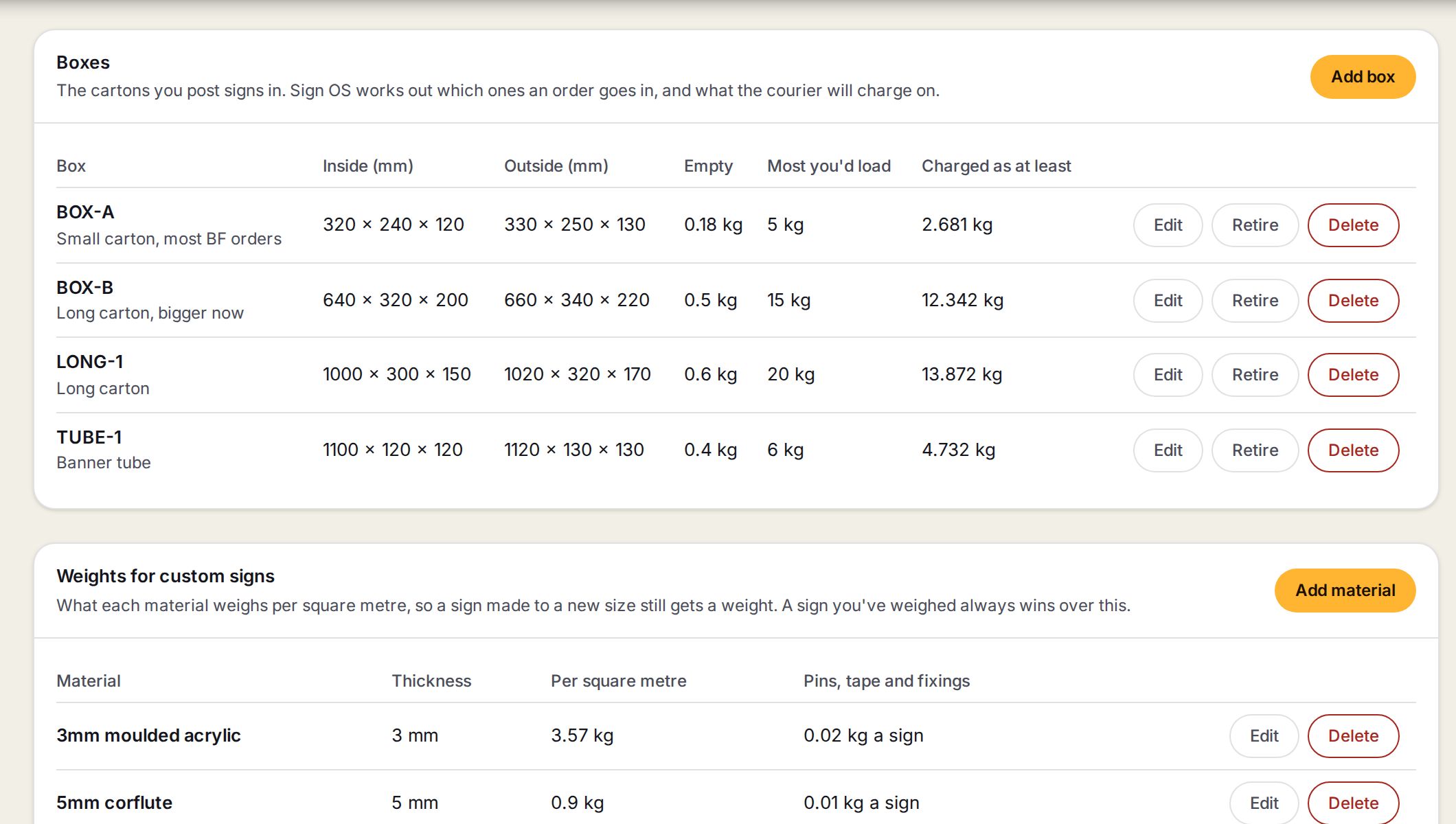
- 1Add boxOpens the form for a new carton, tube or satchel.
- 2The columnsThe box, its inside size, its outside size, what it weighs empty and the most you would load in it.
- 3Charged as at leastThe weight a courier charges for that box even when it is light: its outside size at 250 kg per cubic metre.
- 4Edit, Retire, DeleteRetire keeps a box you have stopped using out of packing without losing it. Bring back undoes it.
- 5Add materialAdds a sheet material and what it weighs per square metre.
- 6Weights for custom signsMaterial, thickness, weight per square metre, and an allowance per sign for pins, tape and fixings.
Step by step
- 1
Open Shipping & delivery
Go to Settings, then Shipping & delivery.
- 2
Add a box
Under Boxes press Add box. Give it a code you use at the bench, the inside size, and if you can the outside size, empty weight and the most you would load. Press Save box.
SettingsShipping & deliveryBoxesAdd box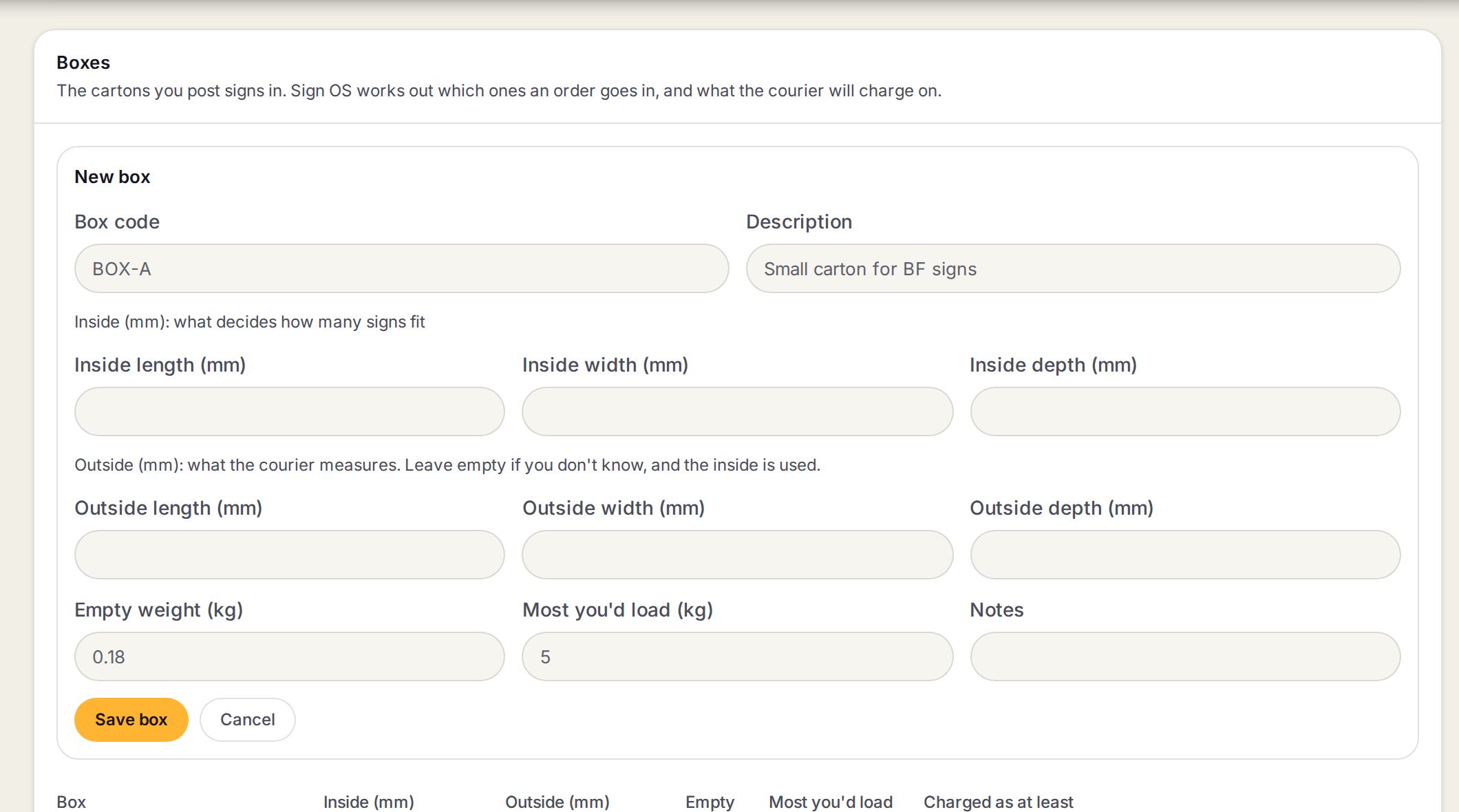
- 1Box code and DescriptionWhat you call it at the bench, like BOX-A. Each code is used once.
- 2Inside length, width and depthWhat fits. Signs are laid flat in the smallest box they fit, biggest signs first.
- 3Outside length, width and depthWhat the courier measures. Left empty, the inside size is used, which charges a little light.
- 4Empty weight and Most you'd loadThe carton's own weight goes into every parcel. A box past its limit spills into another.
- 5Save boxAdds the box to the list.
- 3
Repeat for each box
Add every carton, tube and satchel you use.
- 4
Add your materials
Under Weights for custom signs press Add material for each sheet you make signs from. Enter its thickness, its weight per square metre and an allowance for fixings per sign. Press Save material.
- 5
Done
Quotes now box the order and show the weight the courier charges on.
Words on this screen
Charged weight
The heavier of what the parcel weighs and what its size is charged as. Couriers bill on this.
Cubic weight
A weight worked out from the size of the box, so a big light box still costs something.
Retire
Take a box out of packing without deleting it.
Tips
Have a spreadsheet of weights and boxes already? Import from the spreadsheet, lower on the same page, checks the file first and shows what would change before it writes anything.
A sign you have weighed always wins over the material weight.
Watch out
A sign too big for every box is named on the quote. It is never priced as if it fitted.
Leaving the outside size empty makes every parcel look a little smaller than the courier will measure it.
Common questions
Do I need the material weights if all my signs are weighed?
No. They are only used for signs made to a new size, which have never been on the scales.
What is the fixings allowance for?
Braille pins, tape and standoffs. It is added once per sign, not per square metre.