
Set your shop up in three steps
Your shop, your products, try it yourself — priced from your own costs.
What this is for
A new shop does not start empty. The wizard asks a handful of questions — what you sell most, what you make versus buy in, which departments and machines you have, your markup, whether you are GST registered — and builds a private set of starter products priced from your answers. Every price is then checked with the same calculator your quotes use, and you review the costs before anything is used.
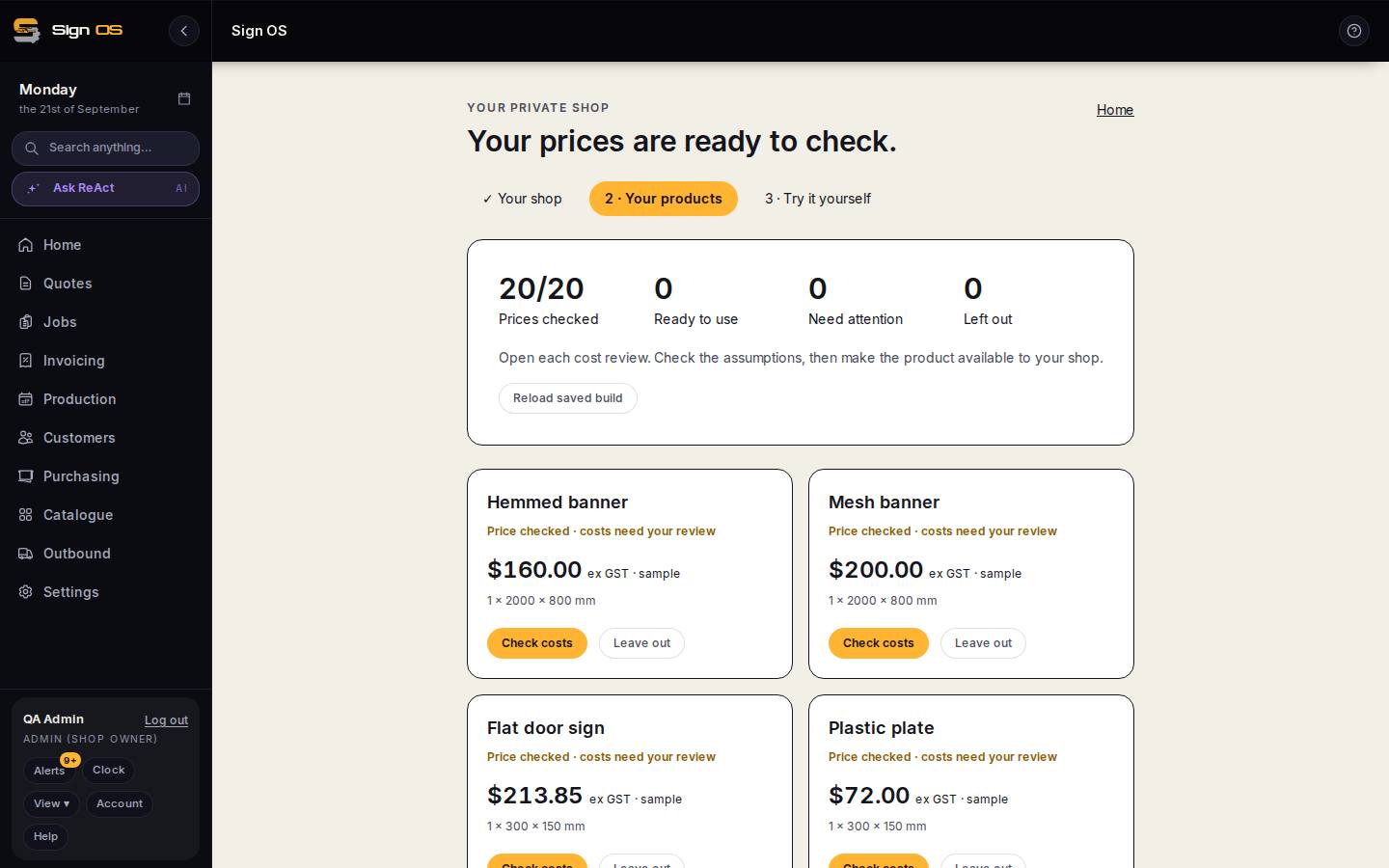
What is on this screen
Each part of the screen above, top to bottom, and what changing it affects.
Phases
- 1 · Your shop
- Shop type; what you sell most and for each family Make it or Buy it in; suppliers or choose later; departments (one word each); machines with cost per hour without the operator; markup; GST yes or no; state. Progress saves as you choose.
- Review my products →
- Sample prices from your answers. Each product lists what the recipe actually charges and prices for other job choices. Change answers goes back; the checkbox confirms you will review costs; Build my shop → builds the private starter catalogue.
- 2 · Your products
- Every saved recipe price-checked with the quote calculator. Counters: Prices checked, Ready to use, Need attention, Left out. Check costs opens the cost review; Leave out drops a product from the build.
- 3 · Try it yourself
- Quote something you already know the answer to and see if Sign OS agrees.
Controls
- Save and leave · Load saved answers · Reload saved build
- Leave any time and come back; nothing is lost between visits.
- Send us your data
- Already have price lists or customer records? Send them and they are loaded for you.
Step by step
- 1
Open it from the card at the top of Home (Start or resume →) or from Settings. Progress saves as you choose, so you can leave and come back; Save and leave does exactly that.
- 2
1 · Your shop: choose your shop type and what you sell most. For each product family say Make it or Buy it in — bought-in products are left out until you have the supplier's real cost. Pick your suppliers or choose later, the departments you need (one word each), the machines you use with their cost per hour without the operator, your markup, and whether you are registered for GST.
- 3
Review my products → shows sample prices from your answers. Each one lists what the recipe actually charges and prices for other job choices. Change answers goes back; tick 'I will check the starter costs and assumptions before use' and Build my shop →.
- 4
2 · Your products: every saved recipe is price-checked. Open each Check costs review, read the assumptions — labour time, machine speed and set-up are starter estimates, supplier prices may be estimates — then make the product available to your shop, or Leave out.
- 5
3 · Try it yourself: quote something you already know the answer to and see if Sign OS agrees with you.
Tips & gotchas
- Your logo, team and business details can wait. Your first prices only need the answers above.
- Everything the wizard builds is private to your shop and can be changed later in the product builder — it is a starting point, not a cage.
- Already have price lists or customer records? Send us your data, under Setup, and we load them for you.