
Decide what the quoter is asked for
Sizes and quantity as boxes to type in, preset sizes, set runs, or your own numbers.
What this is for
Not every sign is priced off a width and a length. Some come in three fixed sizes, some are sold by the 500, and some need a number nobody else asks for — how many installers, how many days, how deep. The Inputs card decides what the person quoting is asked, and what the recipe can run per.
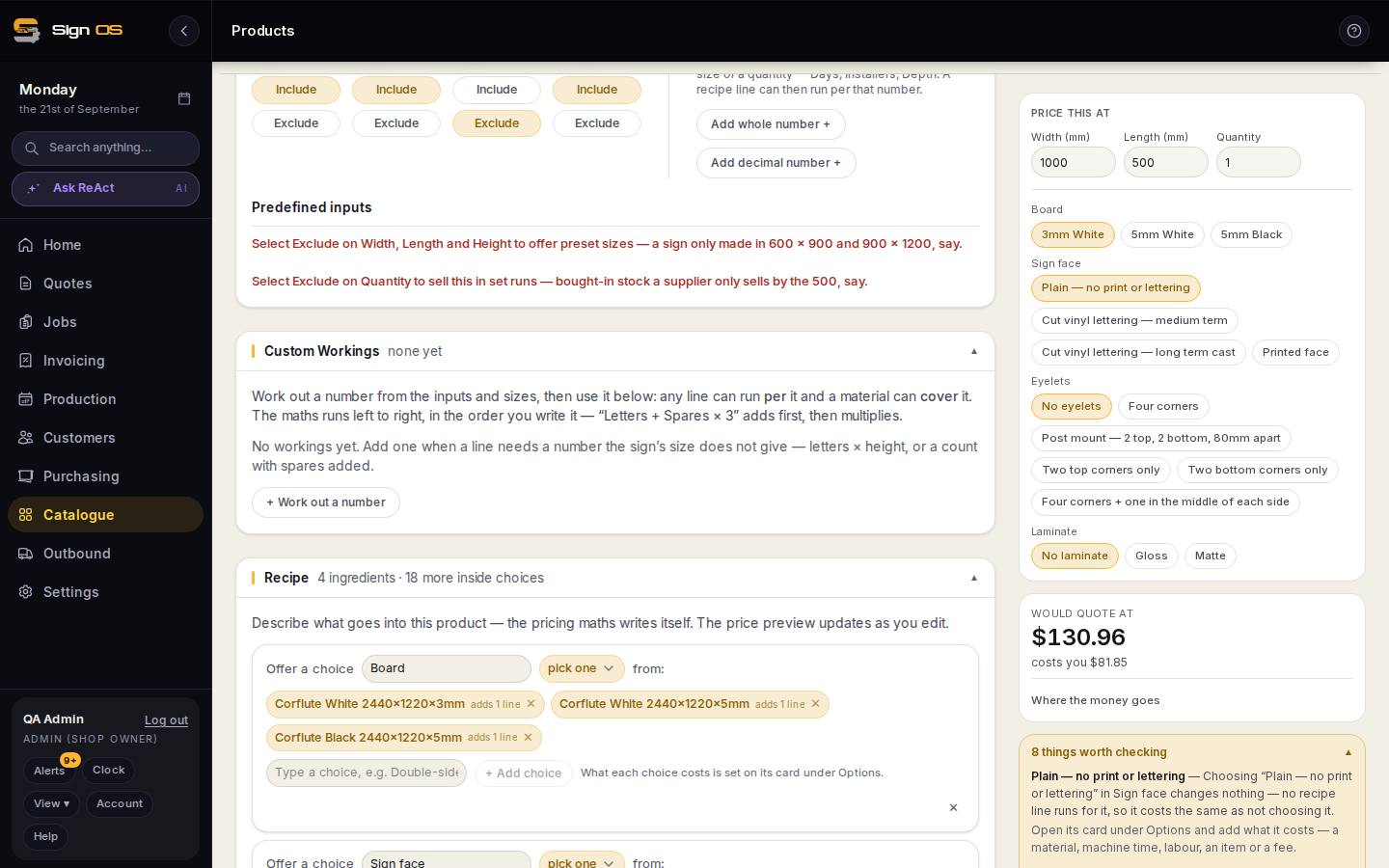
What is on this screen
Each part of the screen above, top to bottom, and what changing it affects.
Inputs card
- Width · Length · Height · Quantity — Include / Exclude
- Include gives the quoter a box to type in. Exclude hands it to the presets underneath.
- Custom inputs — Add whole number / Add decimal number
- A number the quoter types that is not a size or quantity — Days, Installers, Depth. Lines can run per it.
- Predefined inputs
- Excluding the sizes offers preset sizes as chips; excluding Quantity sells in set runs.
Step by step
- 1
Open the product and the Inputs card. Width, Length, Height and Quantity are the default inputs; each is Include (the quoter gets a box to type in) or Exclude.
- 2
Exclude Width, Length and Height to offer preset sizes instead — a sign only made in 600 × 900 and 900 × 1200. Exclude Quantity to sell it in set runs — bought-in stock a supplier only sells by the 500. The presets are chips in an option box, so the quoter picks rather than types.
- 3
Custom inputs: press Add whole number or Add decimal number and name it — Days, Installers, Depth. It appears on the quote line as a box to type in.
- 4
Use it in the recipe. On any line, per can be the quantity, a size, or one of your custom inputs, so 'labour 2 hours per Installer' or 'hire fee per Day' prices itself. A custom input can also feed a worked-out number.
- 5
Save recipe, then check Price this at — your input appears there so you can test it.
Tips & gotchas
- A product with no size at all (an install, a design fee) should exclude all three sizes so the quoter is not asked for a width that means nothing.
- Whole number for things you count — installers, days. Decimal for things you measure — depth, hours.