
Pull orders in from your WooCommerce or Shopify site
Keep selling on your own website; the orders arrive in Sign OS.
What this is for
This is for a website you already have, built on WooCommerce or Shopify — not the Sign OS online store, which is under Online store. Your products keep selling where they always have; Sign OS goes and looks for new orders and brings them in. It only reads. Nothing is installed on your site and your site is never asked to send anything.
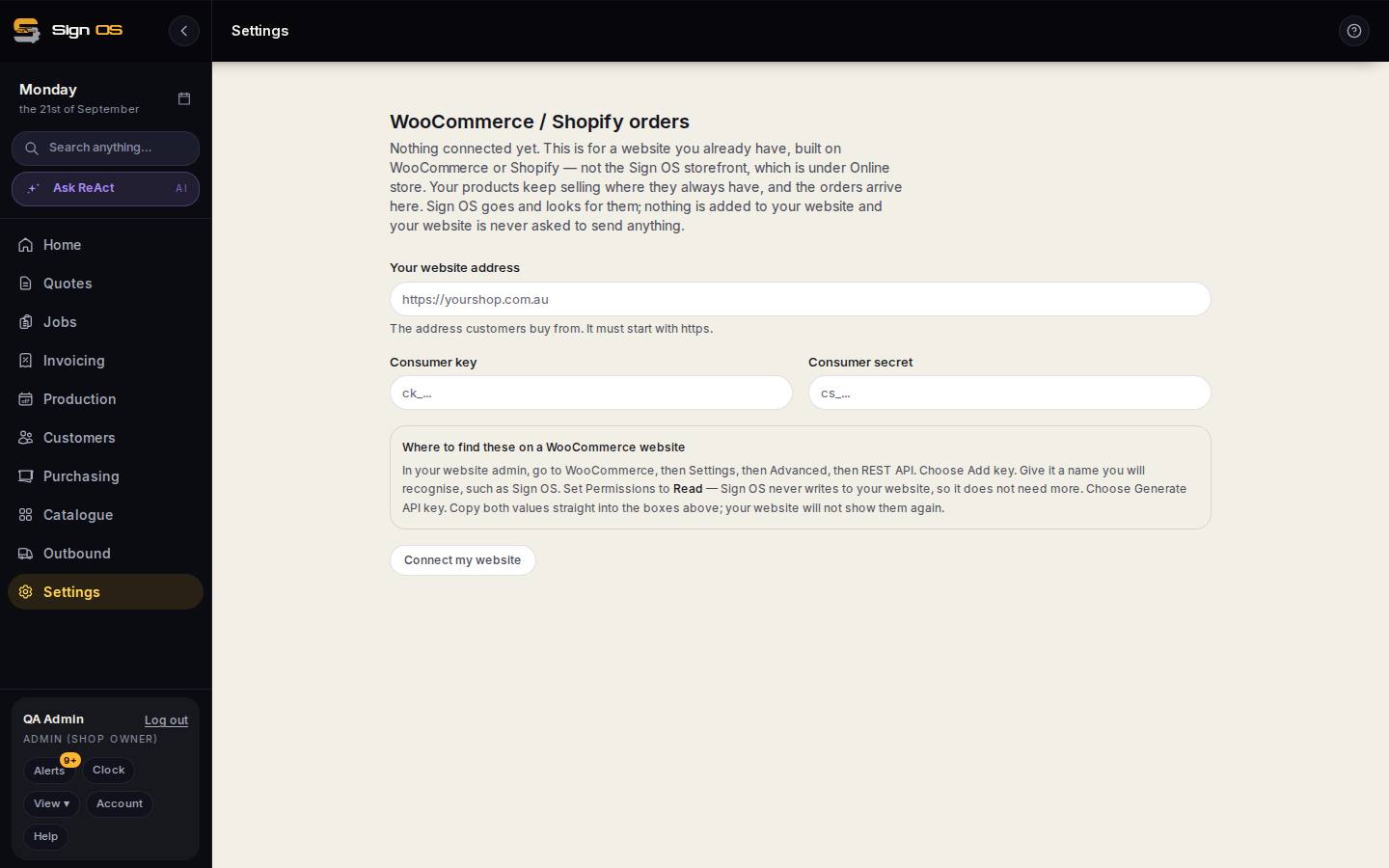
What is on this screen
Each part of the screen above, top to bottom, and what changing it affects.
- Your website address
- Where customers buy; must start with https.
- Consumer key · Consumer secret
- The read-only API key from your WooCommerce admin (WooCommerce → Settings → Advanced → REST API → Add key, Permissions: Read).
- Where to find these on a WooCommerce website
- The steps, on the page.
- Connect my website
- Once connected, new orders arrive under Web orders.
Before you start
- You will need admin access to your website to create a read-only API key.
Step by step
- 1
Open Settings → Integrations → WooCommerce / Shopify orders.
- 2
Enter your website address — the one customers buy from. It must start with https.
- 3
On a WooCommerce site: in your website admin go to WooCommerce → Settings → Advanced → REST API and choose Add key. Name it something you will recognise, such as Sign OS. Set Permissions to Read — Sign OS never writes to your website. Generate the key.
- 4
Copy the Consumer key and Consumer secret straight into the boxes. Your website will not show them again, so do it in one go.
- 5
Click Connect my website. New orders then appear under Web orders, where you handle them like any other.
Tips & gotchas
- Read permission is all it needs. If someone gives it Read/Write, take it back to Read.
- If you want customers to order through a store Sign OS runs for you, that is Online store, a different thing.