
Build your online store
A public store page for your shop, built without code, published when you say.
What this is for
Your online store is a public page where customers see your work and order the products you choose to sell there. You build it from sections — a welcome banner, about, gallery, products, contact — pick a look and a layout, and edits stay in draft until you publish, so you can work on it without customers seeing half a page.
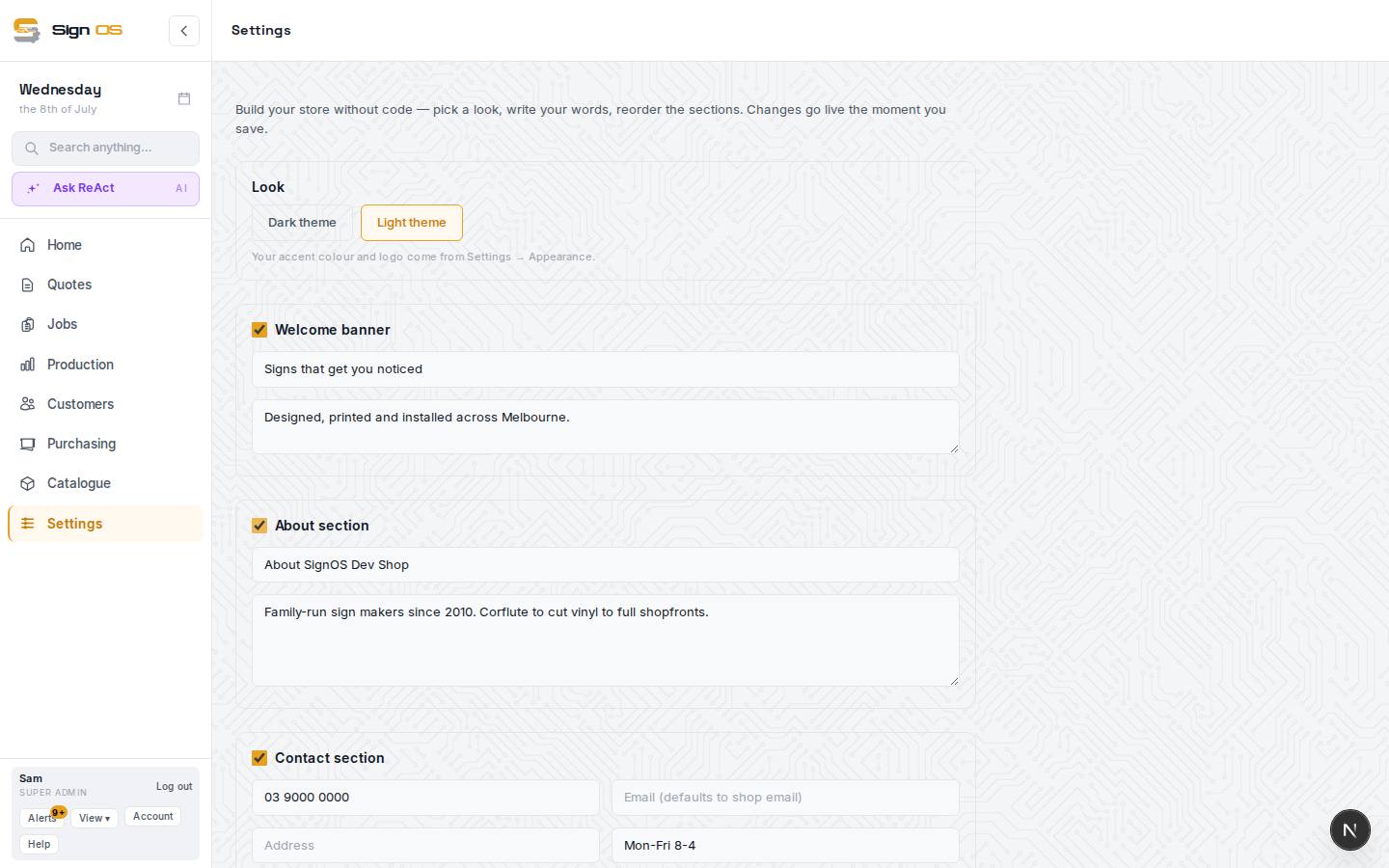
What is on this screen
Each part of the screen above, top to bottom, and what changing it affects.
The builder
- Look · Home page · Products · Pages · Menus & footer · Business & search · Store & domain
- The seven areas down the side. Each opens its own sections.
- Last published · Save draft · Publish
- Edits stay in draft until you publish. Save draft and Publish stay at the bottom of the screen wherever you are.
Look
- Dark · Light · Paper · Midnight · Workshop
- The starting palette. Your store's colours sit on top of it.
- Your store's colours — Button colour · Page background · Cards · Top bar, footer & reviews band · Logo background
- The store's own colours, separate from Appearance, so the store can look different to Sign OS. You pick the surfaces; text colours are worked out from them and checked so they stay readable. Leave any blank to keep the Look.
- Preview
- A small picture of the store in the colours you have picked. Publish to put them on the live store.
- Layout — Showcase · Catalogue · Local · Full range · Solutions
- What the page leads with: your work, prices, your phone number, a big range with search and sliding banners, or the jobs customers need done. Changing it reorders the page.
- Lettering · Animations — Off · Subtle · Lively
- The typeface family, and whether products fade or lift into place as customers scroll.
Home page
- Welcome banner — Banner picture · Banner video · buttons
- The top of the page. A banner video is a short clip that loops behind your headline with no sound; the picture shows while it loads.
- About section · Gallery section · Reviews · Category tiles · Contact section
- Your workshop and crew, your own work, reviews and the rest of the front page.
- Page order
- The order the sections run down the page.
Products
- Your products · How products are shown · Category groups
- What you sell online and the products section of your front page, and headings that group categories in the list down the left.
- Product pages — Product cards: Detailed · Simple
- Detailed shows a short description, lead time and what the price is for. Simple shows the picture, name and from price, like a classic online shop.
- Product order — A to Z · Order added
- How products are listed.
- Welcome code · Thank-you code
- Discount codes. See Give store customers a discount code.
The other areas
- Pages · Menus & footer
- Your own pages, the menu, the phone and hours bar, and the footer. The footer always ends with a quiet Powered by Sign OS link; the extra footer line adds something like a licence number.
- Business & search
- How your store shows in Google and when a link is shared, and the registered name and ABN your footer prints, taken from Business details.
- Store & domain — Turn my online store on · Save store settings · Your own domain
- Opens the store to the public, and puts it on your own web address. The switch saves straight away; it doesn't wait for Publish.
Before you start
- Set your logo and details under Settings → Your business → Business details first; the store uses them.
- Tick 'Sell this product on your online store' on each product that should appear.
Step by step
- 1
Open Settings → Online store. Pick an area down the side; the top says when the store was last published.
- 2
Look: pick a palette, then Your store's colours if you want the store in its own colours. Pick a Layout and Lettering.
- 3
Home page: a wide photo of your own work as the banner picture, a headline and buttons. Describe each picture for screen readers and search engines. Then About, Gallery and the rest, and set the Page order.
- 4
Products: choose Detailed or Simple cards and the product order, and group categories if your list is long.
- 5
Save draft any time, and Publish when you want it live. Orders placed there arrive in Web orders.
- 6
Store & domain: tick Turn my online store on and Save store settings when you are ready for customers to see it. To put it on your own address, add the domain, add the two records wherever your domain is managed, then Check ownership until it goes green.
Tips & gotchas
- A gallery of stock photos is the fastest way to lose a customer's trust. Six real jobs beat sixty perfect ones.
- Your store stays off Google until it is live on your own domain. On the Sign OS address it works for anyone you send the link to, but search engines are told to leave it out.
- Customers can't right-click to save your photos or drag them off the page.
- A product can ask for a quote instead of showing a price: tick Ask for a quote instead of showing a price in the product's online store settings. The customer picks their options and sends a request, with no checkout.
- The store's address is shown at the top of Web orders — put it on your email signature and your van.