Sign OS
ProductTry itReActStatusShippedRoadmapIntegrationsPricingFAQ
Sign inStart free trial
Now live · free 30-day trial · built with real sign shops

Your whole sign shop,
running on one system.

Sign OS takes a job from first enquiry to final invoice — quoting, production, purchasing, accounting, and an AI assistant that works the counter with you. No spreadsheets. No re-keying. No drift.

Start your free 30-day trialSee pricing →

Already on board? Sign in →

Sign OS production timeline — sign shop MIS scheduling jobs across departments
A job moving through Sign OSJ-0871 · Coastal Signs
QuoteAcceptProduceDispatchInvoice
Running
Waiting on materials
J-0871J-0864J-0879
1 record from enquiry to invoice$89 a month to start — all prices AUD$0 onboarding fees — we load your data for you30 days free trial — no card required2-way Xero invoice & payment sync0 spreadsheets requiredAU built in Australia for sign shops
Sound familiar?

A shop full of talent, run on sticky notes.

Spreadsheets, email threads and a whiteboard can hold a sign shop together — right up until they can’t. Every gap between systems is a place where money quietly leaks out. That’s the case for sign shop management software that holds quoting, production, purchasing and invoicing on one record.

Two people quote the same job off two different price lists.
The quote says one thing, the job sheet says another.
The only person who knows where a job is at is the boss.
Material costs live in a spreadsheet nobody fully trusts.
The same job gets re-keyed into three different systems.
Nobody finds out the margin was gone until the invoice.
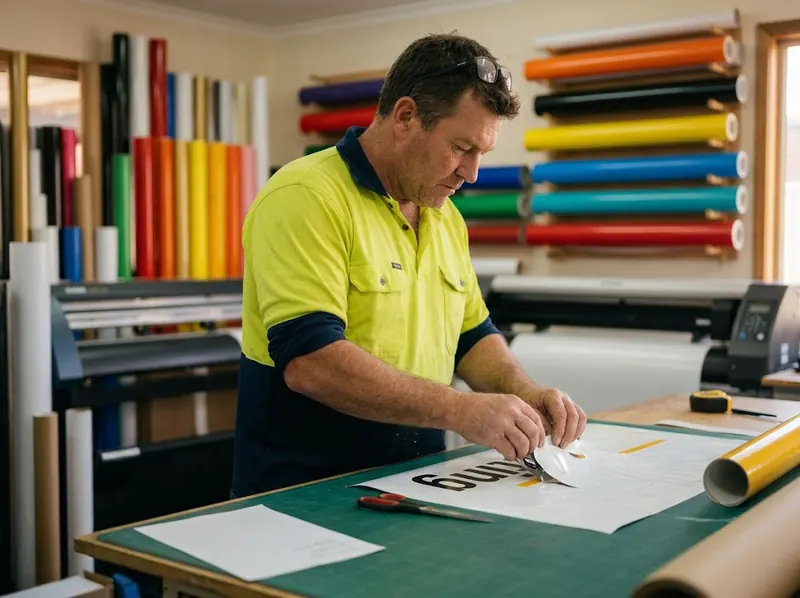
Weeding cut vinyl lettering on the bench in front of the plotter
On the floor
Talking a customer through colours and samples at the shop counter
At the counter
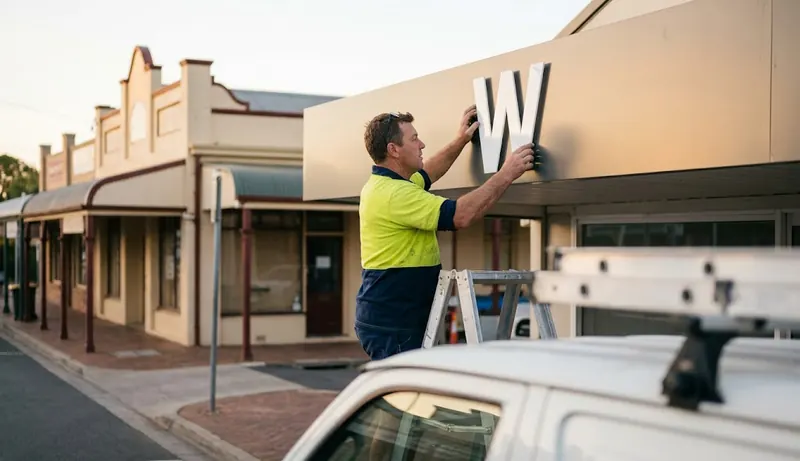
Fitting a dimensional letter to a shopfront fascia at golden hour
On site
What Sign OS is

The full loop, closed.

Define what you sell → price it → quote it → build it → buy for it → invoice it. One record travels the whole way. Click a stage.

stage 01 / 06

Define what you sell, once

Products in Sign OS are living recipes — substrates, machine time, labour, options and markup. Build it once and every quote after that prices itself the same way.

  • Shared global catalogue of materials, machines and processes
  • Shop-level overrides on everything
  • Your markup rules applied at quote time
ProductShopfront fascia — ACM
Recipe3 materials · 2 machines · 4 steps
MarkupSet per material, machine & labour
See it in action

Try it, right here.

Three mini tours you can click through — price a job, put ReAct to work, run a floor board. Scripted demos of real, shipped behaviour.

www.signos.com.au / quotes / new
Step 1 · Add a line
Shopfront fascia — ACMSELECTED
Vinyl cut letteringrecipe
Illuminated lightboxrecipe
A-frame — standardrecipe

Every product carries its own materials, processes and markup rules.

Watch it work

One job, all the way through.

A café emails asking for a shopfront sign, corflutes, banners and an install. Three and a half minutes later it is made, approved, delivered and invoiced — and nobody typed the same thing twice.

One job, start to finish

A café emails asking for a shopfront sign, corflutes, banners and an install. Watch the email become a priced quote, the quote become a job, the proof get signed with a finger, the floor scan it through, and the invoice land in Xero — without anyone typing the same thing twice.

Meet ReAct

The first sign-shop assistant with hands.

Every Sign OS shop ships with ReAct — an operations assistant wired into the same pricing engine, records and permissions as your team. Not a chatbot bolted on the side: it acts, and you approve.

Shipped · works today

Finds anything

“Show me Coastal Signs’ open quotes.” Ask in plain English — ReAct searches quotes, jobs, customers, stock, POs and more, scoped to what you’re allowed to see.

Shipped · works today

Does real work

Drafts quotes, creates customers, updates jobs, raises POs — through the same engine and rules as your staff. You choose which changes ReAct must ask you to approve.

Shipped · works today

Navigates for you

“Open the production timeline.” “Go to job J-204.” ReAct drives the app so you don’t dig through menus — especially handy on the counter with a customer waiting.

Shipped · works today

Reads the room

Ask what’s overloaded, what’s at risk, or how a department is tracking, and get a straight answer built from live production data.

More on how the assistant works, what it can and can’t do yet, and running it on your own ChatGPT or Claude account: AI sign shop software.

Guardrails, by design

ReAct’s tools are gated by the same 70+ per-user permission grants as everything else. Admins pick the approval mode; changes follow your chosen approval setting; every action lands in the audit trail. Floor staff’s ReAct can’t see a price — because floor staff can’t.

Feedback that helps us fix mistakes

Your feedback helps us find mistakes and check improvements to the assistant. Ratings and corrections are used to test answers, not to automatically train a shared model on your shop records.

Next for ReAct — roadmap, not yet shipped
Read a drawing, draft the quoteSuggest materials and suppliersGenerate the SWMS for youToward autonomous job management
No mockups

Real screens, not concept art.

Every one of these is a screenshot of the running product, and every one carries the date it was taken. Where a screen has moved on since, you can see that rather than take our word for it.

Morning check-in

A dashboard for every seat

Owners see pipeline, at-risk jobs and follow-ups. Sales sees quotes waiting. Production sees the floor. Every role opens to exactly what matters to them.

▸ home

Screenshot taken 30 August 2026

Start a quote

A name is enough to quote

No required fields, no form maze. Type who it's for and go straight to pricing — address, terms and identifiers can wait until they matter, behind “More details”.

▸ quotes / new

Screenshot taken 30 August 2026

Quote in minutes

One page from name to send

A customer name is all you need to start. Add lines from your catalogue and the price rail keeps a running total, with a picture of each sign beside its price — margin, markup and Send quote all one click away.

▸ quotes / new

Screenshot taken 30 August 2026

Price like a recipe

Describe the product — the maths writes itself

A recipe is a list of plain sentences: uses this board, covers the sign, plus 10% waste; runs the printer for 5 minutes per square metre. Offer a choice — gloss, matte or no laminate — and the lines that follow it switch on with the pick. Every sentence shows what it adds, and the rail on the right shows what the sign would quote at and what it costs you, recalculated as you type.

▸ products

Screenshot taken 12 September 2026

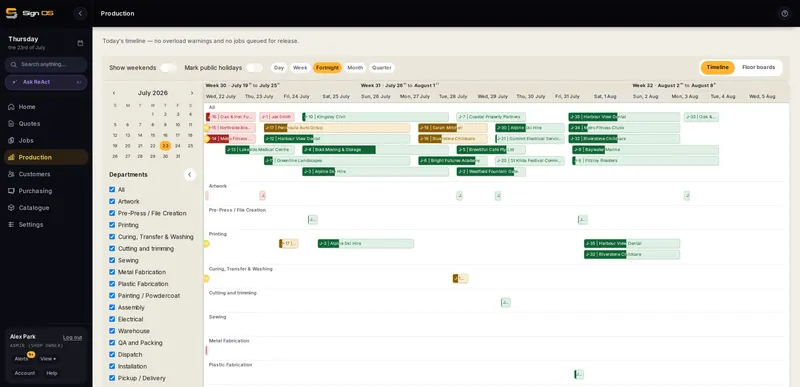
Plan & schedule

The whole shop on one timeline

Every job, every department, one Gantt. Weekend-aware, holiday-aware, with overload warnings before a week becomes a missed deadline.

▸ production / timeline

Screenshot taken 23 July 2026

What you sell

A catalogue you recognise at a glance

Every product carries its own photograph — so the list reads like your own shelves instead of a spreadsheet of names. The same picture follows the sign onto the quote, the job sheet and the customer's PDF.

▸ products

Screenshot taken 30 August 2026

Your floor

Floor boards that mirror your shop

One card per department with live ready and in-progress counts — tap through to a tablet board with big buttons and no prices. Financials never appear on floor screens.

▸ production / floor

Screenshot taken 30 August 2026

Product status

Every capability, tracked in the open.

The live status of every major capability — what's in production today, what's in active development, and what's on the roadmap. Updated with every release.

● Current features
Quoting & estimating14
  • Deterministic quoting & pricing engine
  • One-page quote builder with live price rail
  • Sentence-based product recipes with live price preview
  • Talk to build — describe a product out loud and get a working, engine-priced recipe
  • Paste an enquiry email and get a priced draft quote back
  • AI pricing advisor — flags quotes under your usual margin
  • Import your pricing spreadsheet as an editable price book you can look up (a reference list — the engine still prices your quotes)
  • Repeat a won job as a fresh quote in one click
  • Custom one-off products — any size, priced on your own recipe
  • Type your own price over the worked-out one on any line
  • Choices that can't go together, or must — so a quote can't be built wrong
  • Tiered price-per-square-metre, so bigger jobs price the way you actually sell them
  • Pricing widgets with a no-code rule builder
  • Design tools on the Scale plan — channel-letter designer, LED layout, DXF/SVG cut pricing & sheet nesting
Jobs & production16
  • Quote → job in one click, prices frozen
  • Start a job without a quote, and raise a rework job against the original
  • Customer standing notes — written once, not re-typed onto every job
  • Unified job hub — production, dispatch, purchasing, accounts, files
  • Sign OS Sync (beta) — job folders on your shop drive, synced both ways (Windows & Linux)
  • Production timeline with overload warnings
  • Floor boards & QR job sheets
  • Clock on from a job sheet or shared tablet, and write up a day from the production board. Time keeping is included with Workshop, Scale and Signature. You can also choose it as part of Build your own in Plan & billing.
  • Staff files, leave, RDO requests, policies and recruitment. HR is included with Signature, or you can choose it as part of Build your own in Plan & billing.
  • Safety with Workshop and Scale — licences with expiry reminders, hazards and incidents reported from a phone, SDS, plant services, inductions, risk and change registers
  • Auto bill-of-materials from recipes — exact quantities when the quote snapshot has them; draft PO for shortfalls
  • Council permit tracking with expiry reminders
  • Versioned artwork proofs — per-page customer sign-off, signed by finger or mouse, gating production
  • Take back a proof approval that should not have been acted on
  • Outbound board for dispatch — collections, deliveries and installs, with a branded delivery docket the driver gets signed
  • Prepress job-ticket export
Purchasing & catalogue8
  • Purchase orders & receiving
  • Supplier RFQs — suppliers price your materials in their own portal, and the answers compare side by side
  • Product & material catalogue with reusable recipes
  • Product change history — restore a product's details from any earlier version
  • Vehicle wrap library with reusable panel templates (manual measurements)
  • Bulk CSV import — customers, materials, suppliers, products & open jobs
  • Bring your history across from your old system — past work stays searchable
  • Merge duplicate customers without losing what either one was carrying
Invoicing & accounting5
  • Branded PDFs — quotes, invoices, POs, job sheets, SWMS
  • Two-way Xero invoice & payment sync
  • QuickBooks connection — two-way invoice & payment sync
  • Invoice clients via Stripe — funds to your own bank
  • Self-serve billing — start, change or cancel in-app
Paperwork that looks like yours5
  • A picture of the sign on the quote, the catalogue, the job sheet and the PDF
  • A different photograph per colour or finish, so the customer sees what they chose
  • Your own logo on your own quotes, invoices and POs
  • Trade under your own name — your business on the paperwork, not ours
  • A custom email sending domain, so quotes arrive from your business
Online store & client portals9
  • Online store — customers configure, price & order into your queue
  • Storefront card checkout — available once your Stripe account is connected and verified; funds straight to your bank
  • No-code store builder — themes, gallery, FAQ & reorderable sections
  • AI-written storefront product descriptions
  • Custom storefront domains
  • Store colours of your own, separate from the app
  • VIP client portals — account catalogues at agreed prices
  • Guest artwork upload straight onto the job
  • Multi-shop supplier & installer dashboards
AI assistant (ReAct)5
  • Plain-English search, drafting & app navigation
  • AI changes follow the approval setting you choose
  • Talk to it — voice dictation on any AI field, and Talk to build for whole product recipes
  • AI drafts customer emails, and sketches SVG artwork for a designer to finish
  • Connect your own AI (Claude & co.) over a read-only MCP endpoint
Dashboards & reporting7
  • Role dashboards — owner, sales, projects, production, accounts
  • Report builder — pick your figures, chart them, save them to a dashboard; CSV, Excel & PDF exports
  • Profit analytics by job, customer & product
  • Invoice aging — who owes what, and how overdue
  • Watchdog rules — get told about low-margin quotes or stalled jobs
  • Notification centre for everything that needs a human
  • Global search across every record
Admin & control8
  • Approvals inbox & workflow policies
  • Granular permissions — 70+ per-user grants
  • Aftercare & warranty follow-ups, a Google review ask after a first order, and time-based automations
  • Customer branding profiles — colours, fonts & logos on file
  • White-label appearance — your logo, your colours
  • Inbound email filed to the right job, with attachments
  • Guided onboarding tour for every new shop
  • Guided shop setup with starter recipes you edit to suit
◐ In development
  • Not switched on yet: MYOB accounting connection. Built and tested. MYOB charges for developer access, so it stays switched off until enough shops need it. Xero and QuickBooks are live now
  • Outlook & Gmail tag companions — the add-ins are built; connecting a mailbox still needs us to set it up with you
  • Sign OS Sync on macOS — Windows and Linux are both tested and in beta; the Mac build is not ready to hand to anyone yet
  • Code-signed desktop sync installers — Sign OS Sync installs behind an unsigned-publisher warning until the certificates are bought
○ Planned
  • Live rego-plate → vehicle dimension lookup (bring-your-own data key)
  • Automatic printer-fleet cost capture from RIP telemetry
  • Deeper prepress vendor connectors (Onyx, Caldera & co.)

Every item listed as working is verified in the live product before it appears here.

Shipped recently

What landed in the last few weeks.

Every release, dated, in plain English. No marketing rewrite — this is the same list our shops get.

3 October 2026

Signature, the online designer, and build your own plan

  • Signature is a new top plan at $349 a month: everything in Scale plus the online designer, HR, your own email domain and an unlimited AI assistant, with 30 users and 2 TB of storage.
  • With the online designer your customers design their own signs on your templates, adding their wording, their own logos as PDF, AI, EPS or SVG files, and colours mixed in CMYK, then send the design to you for a quote or order and pay for it in your online store, and the print-ready PDF and proof land on the quote or job.
  • Templates can start from a PDF you've already set up, picking up its cut, bleed and safe lines from their spot colours even on shaped signs like teardrop banners, and a design can carry braille that prints on its own page.
2 October 2026

Sign up with Xero, card fees in your prices, and a job card that compares quoted with actual

  • You can now sign up and sign in with Xero, and a new shop can bring its customers, suppliers and business details across from Xero in one go: you choose what comes over, nothing is sent back to Xero, and trials can now link Xero too; if someone unlinks Sign OS from inside Xero, the shop is told instead of finding out when an invoice fails to arrive.
  • A new Card and payment fees setting in Pricing builds a percentage into every price your customers pay, so you can cover card costs without a card-only surcharge.
  • The job card now sets quoted against actual side by side, using charge-out rates you set for each type of work and an optional flat admin fee, and a new Bill this job button invoices the quote, the actual figures or an amount of your own.
28 September 2026

HR & Safety arrives, and two-step sign-in

  • HR & Safety is a new place in the sidebar for every staff member's licences and tickets with a reminder before they run out, hazards and incidents reported from a phone, safety data sheets, machines with their service and repair history, workplace inspections, safety meetings and the regulations your shop works to; the safety records come with the Workshop and Scale plans, and Scale adds inductions staff can't skip, a risk register, a process change register and job safety plans filled in from them.
  • The HR add-on, on any plan, keeps a file for each person with their leave and RDO requests that go straight onto the planner once approved, doctor's certificates, change of hours requests for making up time, an onboarding checklist you tick off together with a new starter and a pack of files they confirm they've received, performance reviews and improvement plans, the checklist for someone leaving, and recruitment with ReAct reading the resumes.
  • Sign OS never hands you a ready-made policy, letter, checklist or job safety plan: each one starts blank with a guide beside it on what to decide, what to cover and where to get proper advice, and staff read and sign the policies you write on their phone.

Every release, back to the beginning →

Where it's heading

The roadmap.

Shipped in the order that matters most to a working shop. No dates — if your shop needs something moved up, tell us and it moves.

Now

Harden the core

  • As new shops come on board, what they tell us goes straight back into the features they are already using
  • Depth in what is there before breadth — the tools you use every day getting better every week
Next

Connections worth having

  • More integrations, and more suppliers willing to work with Sign OS
  • Live pricing pulled straight from a supplier's own system by API — so your costs stay right with nobody maintaining a price list
Later

The harder problems

  • Web-to-print
  • AI estimating that reads a drawing or a set of plans
  • Automatic prepress
The long-term goal

Sign OS handles the administrative heavy lifting, from quoting to workflow tracking, so shop owners can spend less time behind a desk and more time building.

Why Sign OS

Built by sign people, engineered like software should be.

Designed from years inside the industry — not by developers guessing how sign shops work. Three things set it apart:

A sign shop team checking a fresh print together on the workbench
Built around real shops
01

Signage-native, to the millimetre

Sheets and rolls, sqm and lm, waste and yield, weeding and nesting — the pricing engine speaks sign shop, not generic ERP. It prices the way your estimator thinks, with depth horizontal software can't match.

02

One record, the whole loop

Enquiry → quote → job → floor → PO → invoice, one system, zero re-keying. Most tools cover a slice; Sign OS closes the loop, so every job makes the next one faster to quote and easier to run.

03

AI with hands, not a chat widget

ReAct executes real operations under real permissions, and every rated interaction makes it sharper. As the assistant earns trust, Sign OS moves from software you drive to a shop that runs itself.

Every decision starts with one question: does this move a job from enquiry to paid with less friction than yesterday?

Questions

Straight answers.

What is Sign OS?

One connected platform for a whole sign company — CRM, estimating, quoting, production, scheduling, purchasing, invoicing and accounting, plus ReAct, an AI assistant that works inside all of it. Instead of ten tools that don't talk to each other, every stage of a job lives in one place.

Who makes Sign OS?

Todd Farrell, who built it after years on the tools in the Australian sign trade as an installer, estimator and production manager. Sign OS is a registered business name; Todd runs it as a sole trader in Victoria, Australia (ABN 50 613 736 709). Sign OS, two words, is sign shop software. It isn't Signos, the US glucose-monitoring app, or signageOS, the digital-signage platform. The detail is at signos.com.au/about.

Can I get my data out of Sign OS?

Yes. Quotes, jobs, invoices, purchase orders, products, materials, your price book and timesheets export to CSV or Excel yourself, with no fee, and every artwork file and photo downloads as a ZIP. Customer and supplier lists need a request for now. Your data is backed up nightly, and if you leave it's deleted 30 days after your account closes. The detail is at signos.com.au/your-data.

How mature is the platform?

The core loop — quote, produce, purchase, dispatch, invoice — runs in production today, along with your own no-code online store, custom domains, VIP & multi-shop supplier/installer portals, two-way Xero and QuickBooks accounting sync, desktop file sync for Windows and Linux (macOS is not ready yet), versioned artwork proofs with customer sign-off, and custom reports. Storefront card checkout is available once your Stripe account is connected and verified — until then, orders land as enquiries for you to confirm and invoice. Two things are built but not switched on yet: the MYOB connection (MYOB charges for developer access, so it waits until enough shops need it) and the Outlook/Gmail tag companions (connecting a mailbox still needs us to set it up with you). The status board above reflects the current release. The detail is at signos.com.au/status.

How does quoting stay accurate?

You define each product as a recipe once — materials, machine time, labour, markup. The deterministic engine then prices every quote the same way, deriving usage, waste and time automatically. Overrides are always allowed and always visible.

What exactly can ReAct do today?

Find any record in plain English, create and update quotes, jobs, customers and POs (following your chosen approval setting), navigate the app for you, and summarise live production. It runs under the same per-user permission grants as your staff, and admins choose how strict approval mode is.

What about my accounting system?

Sign OS generates operational invoices and syncs two-way with Xero and QuickBooks today — sending invoices out and reading payment status back. The MYOB connection is built and tested, but MYOB charges for developer access, so it stays switched off until enough shops need it; we won't put a date on it. Sign OS is not the general ledger; your accountant keeps their system.

Who sees what?

Roles plus 70+ per-user grants control everything down to line costs, margins and buy prices. Floor staff never see a dollar figure. Approval policies can gate quote sends, invoice issues, PO sends and variations.

What support do we get?

Guided onboarding when you join, email support at [email protected], and a growing library of shop-floor guides. ReAct also answers how-do-I questions inside the app, against your own data.

When can I use it?

It's live — you can start a free 30-day trial right now, no card needed. The newsletter is just for feature news and pricing updates: no spam, easy unsubscribe.

Newsletter

Stay in the loop.

Sign OS is live — start a free 30-day trial any time. Join the newsletter for new features, pricing changes and shop-floor tips. No spam, easy unsubscribe.

No spam — occasional product news and pricing updates, easy unsubscribe.

Prefer a guided walkthrough for your shop? Reach the team at [email protected]

Sign OS
FeaturesCompareSign shop guidesBlogHelp centreFeature statusUptimeChangelogRoadmapAboutIntegrationsPricingTermsPrivacyYour dataContactFree demoFor installersFor suppliersSign in →

© 2026 Sign OS · The operating system for sign manufacturers

Run by Todd Farrell, sole trader · Victoria, Australia · ABN 50 613 736 709 · Prices in AUD · Xero connected