
The quotes list & statuses
Every quote from draft to accepted, and what each status means.
What this is for
Quotes is the shop's pipeline in one list. Each row is a quote with its customer, project name, grand total, status, the date it was created and who quoted it. Click a row to open the quote; the actions on the row let you duplicate one or delete a draft without opening it.
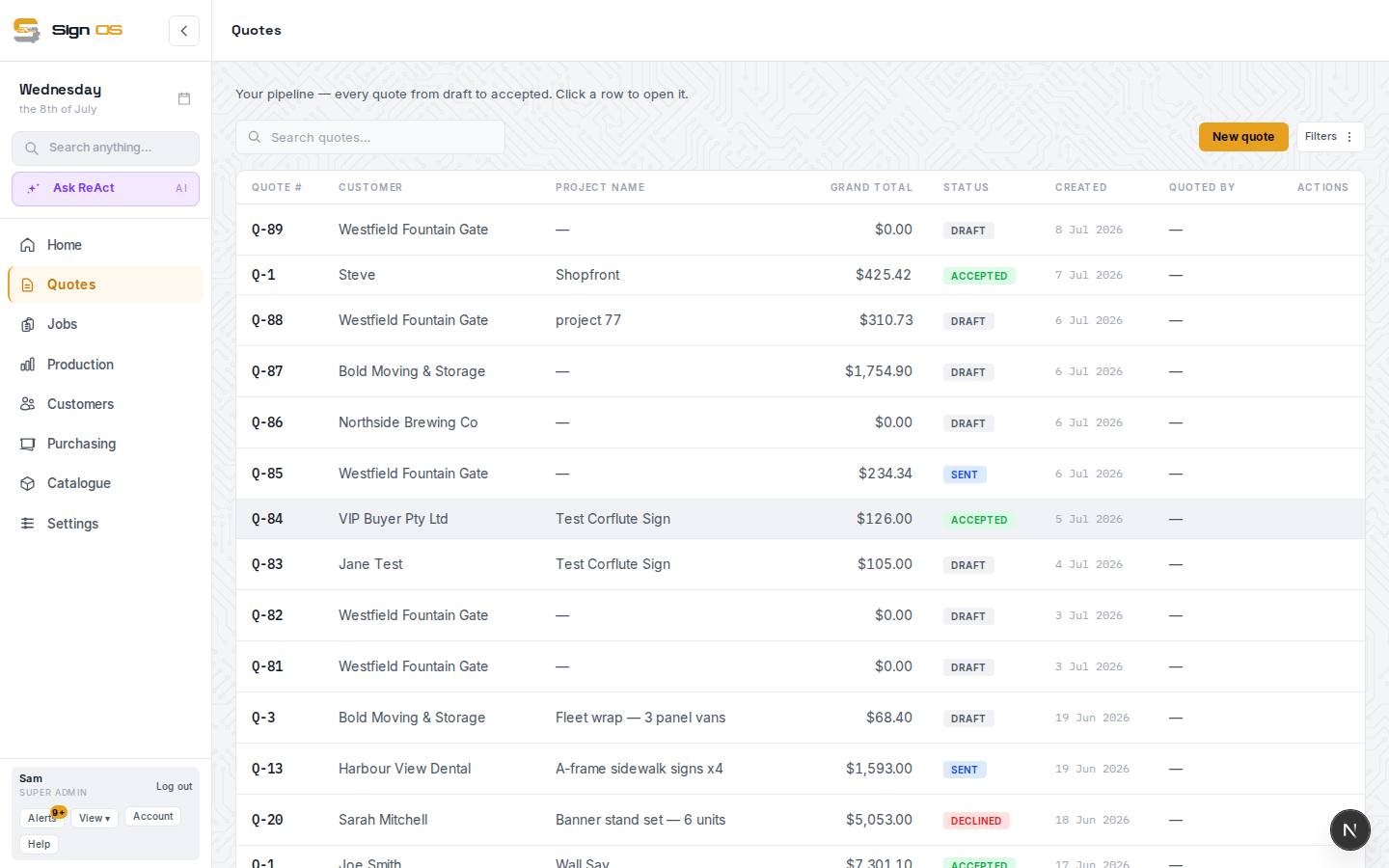
What is on this screen
Each part of the screen above, top to bottom, and what changing it affects.
- Search quotes… · All quoters · Filters
- Find by number, customer or project; All quoters switches between everyone's and your own; Filters narrows by status, date or customer.
- Enquiries · ✨ From email · New quote
- Enquiries is the inbox of web and email enquiries waiting to be quoted; From email drafts a quote from a pasted enquiry; New quote starts blank.
- All · Draft · Sent · Not emailed · Accepted · Declined · History
- Narrows the list. Not emailed shows quotes marked sent in the last 60 days that no email has gone out for. History only shows for a shop that brought its old system's quotes across, and lists just those.
- Quote # · Customer · Project name · Grand total · Status · Created · Quoted by
- Status is DRAFT, SENT, NOT EMAILED, REPLACED BY, ACCEPTED or DECLINED. Click a row to open the quote.
- Duplicate · Delete
- Duplicate copies a quote as a new draft for the same customer. Delete removes a draft or a dead sent quote; accepted quotes cannot be deleted.
Step by step
- 1
Open Quotes in the sidebar. The newest quotes are at the top; the list pages at 25.
- 2
Read the status: DRAFT is being built, SENT has been emailed to the customer, NOT EMAILED was marked sent but no email has gone from Sign OS, REPLACED BY means a newer revision has gone to the customer, ACCEPTED has been won (and is a job), DECLINED was lost. All quoters switches between everyone's quotes and your own.
- 3
Press Not emailed to see the quotes marked sent that never went by email. If one should have gone, open it and press Email quote.
- 4
New quote starts a blank one. From email drafts a quote from an enquiry email. Enquiries opens the inbox of web and email enquiries waiting to be quoted.
- 5
Duplicate on a row copies a quote as a new draft for the same customer — the fastest way to quote a repeat order. Delete removes a draft or a sent quote that never went anywhere; accepted quotes cannot be deleted.
Tips & gotchas
- A quote's Q number never changes and is never reused, so it is safe to quote it to the customer.
- Sent quotes with no answer after seven days show up on the Home screen under Follow-ups. A follow-up automation can chase them for you.
- Quotes marked sent but never emailed also show in Alerts, so one forgotten when you were called away from your desk does not sit there unsent. Dismiss the card if you sent them another way.
- Quotes brought across from your old system sit in the list beside your Sign OS ones, with a badge naming the system they came from. They are history: read only.