
Start a quote — who it is for
Pick a customer, or just type a name. A name is all a quote needs.
What this is for
A quote begins with who it is for, and Sign OS will not hold you up over it. Pick a customer you already have and their saved addresses and contacts are offered; or just type a name and quote — the record can be saved later, or the quote can stay a one-off.
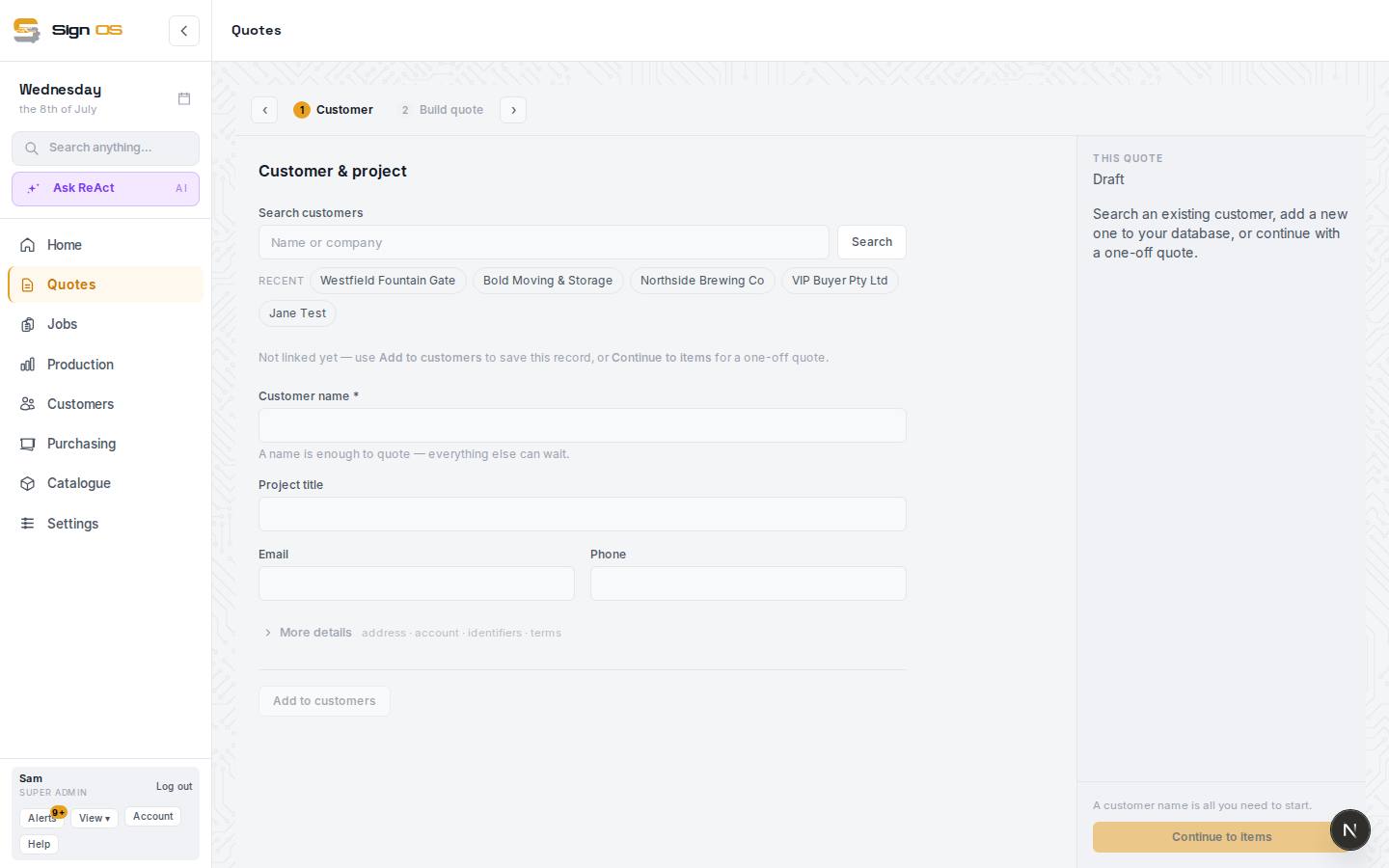
What is on this screen
Each part of the screen above, top to bottom, and what changing it affects.
Who it's for
- Find an existing customer · Recent
- Search, or pick one of the last five. Every word you type has to match, so "Reece Mel" finds Reece - Melbourne. A long list says how many match and shows 20 more at a time. Picking one brings their saved addresses and contacts.
- Quote address · Quote contact · + Add address · + Add contact
- Which of the customer's addresses and contacts this quote uses; add a new one to the customer from here.
- Use as one-off instead
- Detaches the quote from the picked customer.
- Customer name · Project title · Email · Phone
- A name is all a quote needs. Add to customers saves the record; otherwise the quote stays a one-off with the contact you type.
- More details
- Address, account, identifiers and terms for a one-off. Payment terms starts on your shop's default credit term, and that is the term the customer gets when you press Add to customers; pick None or another term first if they need something else.
- Done · Change
- Once the quote has a customer name, Done folds Who it's for to one line: customer, contact and address. Change opens it again. A quote you come back to opens folded.
The rest of the page
- When & where
- Dates and fulfilment, folded to one line once the quote has lines or a date. See When & where.
- Your quote
- Each line as the finished quote reads it: name, code, the customer's wording and size, with Qty, Each and Total columns. Edit opens the line; Remove takes it off.
- Add a line
- The family tiles, the product list, + Custom item and + Copy from another quote. Closed until the quote has a name.
- Files
- The quote's files, such as the customer's logo or site photos, added without leaving the builder.
- This quote (right rail)
- The Q number once saved, each line and its price, Round the total to the nearest…, Markup on the whole quote in % points, Total, Gross margin, Markup, Total markup, how many lines still need pricing, Email quote, Mark as sent without emailing, Accept and make job, Save draft and Review everything first →.
Step by step
- 1
Press New quote on the Quotes list. The builder is one page: Who it's for at the top, your lines in the middle, Add a line below, and This quote — the running total — down the right.
- 2
Under Who it's for, search for an existing customer or pick one from Recent. Their saved addresses and contacts appear as Quote address and Quote contact; pick the ones for this job, or + Add address / + Add contact to add a new one to the customer from here.
- 3
Or just type a Customer name. A name is enough — everything else can wait. Press Add to customers to save the record, or leave it as a one-off quote that keeps the single contact and address you type.
- 4
Give it a Project title so the quote is findable later, and an email and phone if you have them. More details opens address, account, identifiers and terms.
- 5
Add a line becomes available as soon as the quote has a name. Save draft any time; the quote gets its Q number on the first save.
- 6
Press Done and Who it's for folds to one line, so the lines are what you see. Press Change to open it again.
Tips & gotchas
- Use as one-off instead, under a picked customer, detaches the quote from the record if you picked the wrong one.
- Picking a customer with credit terms or a pricing group applies them to the quote automatically.
- Your quote reads like the finished quote, so you can check what has been priced without opening each line.