
Plan production on the timeline, week and people views
One plan for every job, three ways to look at it, live on every screen.
What this is for
Sign OS plans every released job by itself. It works out the latest each step can start and still make the due date, then forecasts when the shop will really do it: filling each department's and each person's days from today, most urgent first, round leave, closed days and work already under way. The planner shows that one plan three ways, and every change shows on every screen within a second or two.
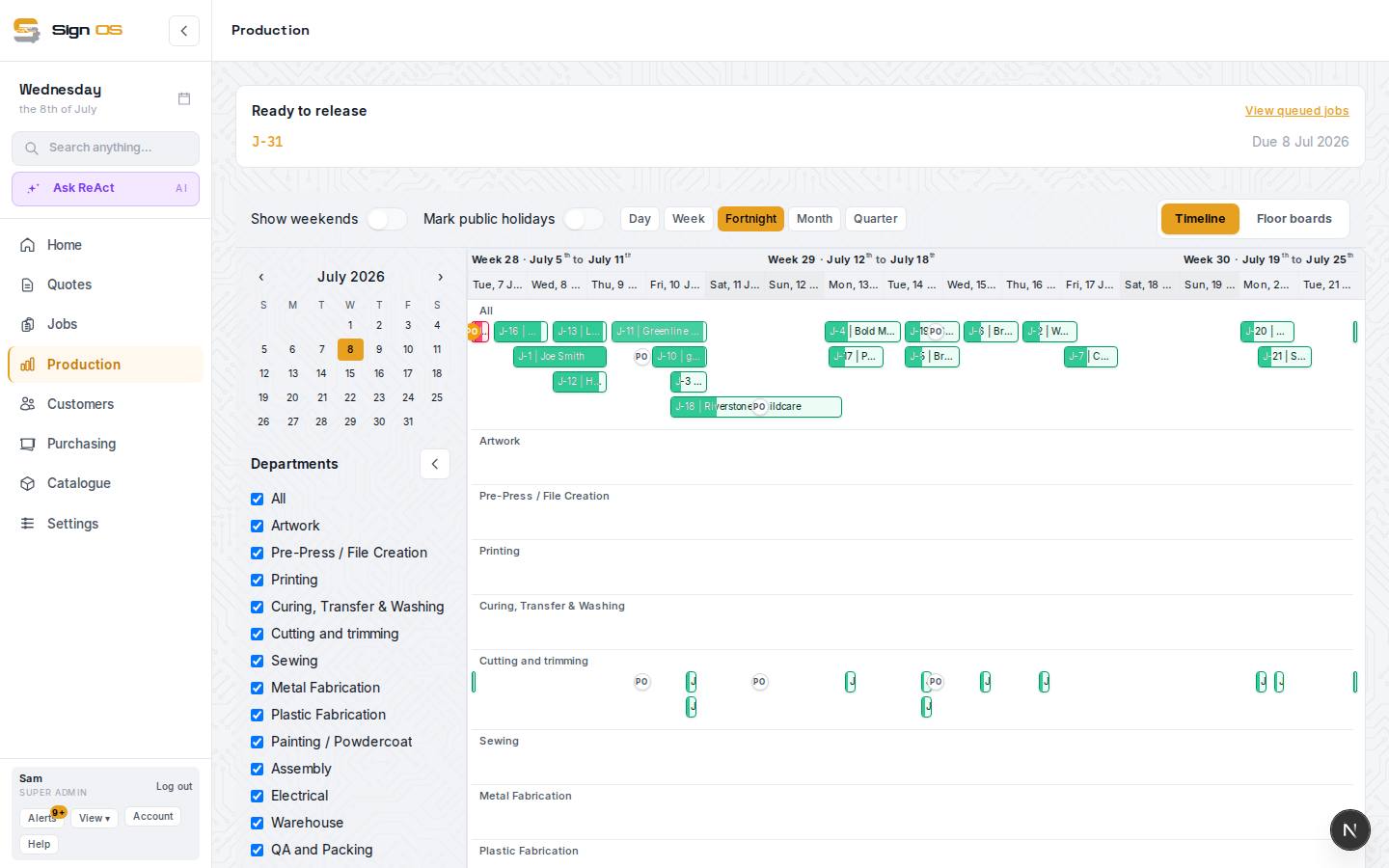
What is on this screen
Each part of the screen above, top to bottom, and what changing it affects.
- To release · Schedule · Floor boards · Outsourced · My work
- Production's tabs. To release is the jobs waiting to go on the plan; Schedule is this planner; Outsourced is work out at suppliers (for people who can see purchase orders). Floor-only logins get Floor boards and My work.
- Timeline · Week · People
- The same plan as a timeline across departments, a week of day columns, or a row for each person. Your place and department filter stay as you switch.
- Day · Week · Fortnight · Month · Quarter (Timeline)
- How much time the timeline shows. A row for every department shows every step, not only the next one.
- ‹ This week › (Week and People)
- Move a week at a time, or back to this week.
- Departments (All + each)
- One department's work and load, or the whole shop.
- Compact · Standard · Full
- How much each card shows. Your choice, kept on this computer.
- Tray (left) — Waiting for release · On hold · Needs a time · Workshop tasks
- Jobs not yet released, jobs on hold, steps with no time set, and workshop tasks without a day. Drag from here onto a day, or drag a card back here to let Sign OS plan it again.
- Strip under each day
- How full the department (or person) is that day: planned time against the time they have. Over-booked says by how much.
- Cards and bars
- Job number and client, what's being made, the department's colour on the edge, who's doing it, the due date, and the job's labels on Standard and Full cards. Finished work stays where it was done, ticked.
- Job panel (right)
- Click a card or bar: every step, who's on it, when it's planned, Move to…, Unpin and labels. No prices.
Step by step
- 1
Open Production → Schedule in the sidebar. Timeline, Week and People sit along the top of the planner; the tabs above it go to To release, Floor boards, Outsourced and My work.
- 2
On Week, each column is a working day with its cards in the order the shop will get to them. The strip under the day says how full it is. Pick a department to see just its work and load.
- 3
On People, each row is a person and their week, with leave and days off greyed out. Work nobody has been given sits in its own row at the top.
- 4
On Timeline, zoom from a day to a quarter. The All row has one bar per job from its first step to its last.
- 5
Tick the circle on a card to finish that step, the same as Finish on the floor board: time stops and the next department sees it.
- 6
Click any card or bar to open the job panel on the right. Open job goes to the full job.
- 7
Sign OS plans it, you steer it: drag a card to another day, onto a person, or back to the tray, and Undo puts it back. See Move work on the production planner.
Tips & gotchas
- Sign OS keeps two dates for every step: when the shop will do it (where the card sits) and the latest it can start and still be on time (Start by, in the job panel). A card the plan has finishing after the job's due date says Late, and the floor boards say Late on the same jobs.
- With Settings → Production → Job sheets → Let jobs be put on hold on, a job waiting on the customer (the vehicle from the dealer, a sign-off) can be put on hold from Job details, with a reason. It moves to On hold in the tray, takes nobody's time, can't be released, and its steps can't be started on the floor until it's taken off hold. A step already running can still be finished.
- With Settings → Production → Job sheets → Show which job sheets have been printed on, To release marks each job Sheet printed or Sheet not printed, with a Print job sheet button on the ones nobody printed yet. Printing or downloading a job sheet anywhere marks it printed.
- A department whose strip is over-booked day after day is your bottleneck; the fix is people, hours or outsourcing, not moving the same jobs around.
- The plan works round your working days and hours from Shop hours & calendar, each department's closed days, people's leave, and anything on the Planner that takes time off a department.
- Installs, and anything after them on a sign, are planned after the workshop work. Which departments are installs is a switch on each department in Settings > Departments.