
The floor boards
Each department's live queue of work, as a simple board.
What this is for
A floor board is one department's work for the people doing it: what's running now, and what can be started next, in the order the Schedule has planned it. Staff press Start, Pause and Finish on the card, and everyone else sees it within a second or two. No prices.
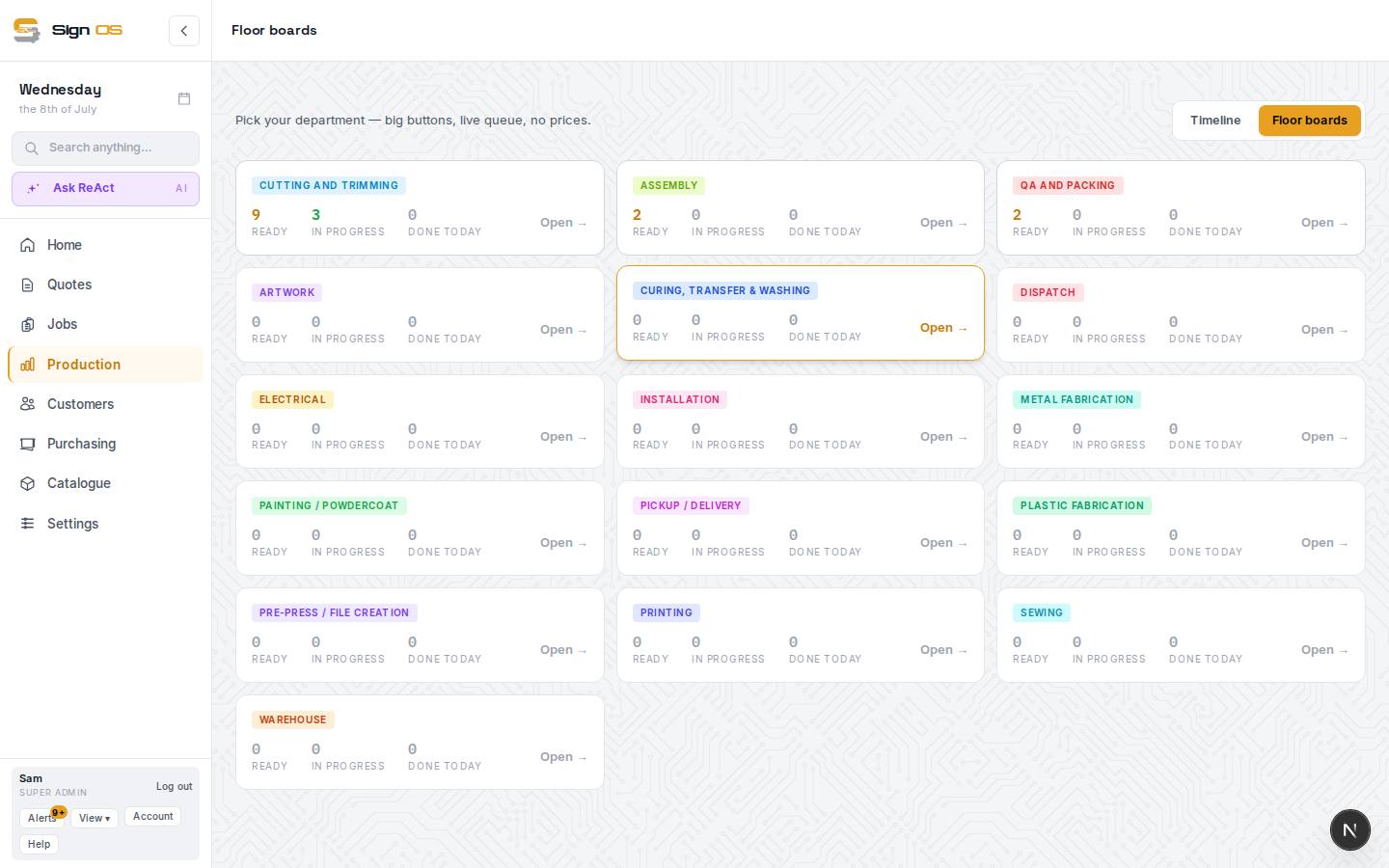
What is on this screen
Each part of the screen above, top to bottom, and what changing it affects.
Floor boards (department picker)
- To release · Schedule · Floor boards · Outsourced · My work
- Production's tabs. Floor-only logins see Floor boards and My work.
- Department tiles — Ready · In progress · Done today · Open →
- A live count for each department. Open → is that department's board.
A department board
- In progress · Ready to start
- Side by side at the top. Ready to start is in the order the Schedule will get to them, urgent jobs first, with the planned start and finish times on each card.
- Waiting on another step · Done today
- Folded away below; press Show to open. A waiting card says what it waits on ("Waiting on Print in Printing · not started yet").
- Start · Pause · Resume · Finish
- Start on a ready card, Finish on a running one. Pause and Resume only where your shop lets staff pause a step (Settings → Departments). Finish offers Undo for a few seconds.
- Urgent · On hold · Late · Still drying until …
- Late means the Schedule has the job finishing after its due date, with "Now finishing" the new date. On hold gives the reason; nothing on that job can be started until it's off hold. Still drying says when the step before it is dry enough to carry on.
- Computer · Tablet · Phone · Pictures
- How the cards are laid out for this screen (big cards and buttons on a tablet, compact rows on a computer, full-width buttons on a phone), and whether product pictures show. Each device remembers its own choice.
- Assigned: <name> · Everyone · Mine
- Only where your shop has Assign steps to people turned on (Settings → Departments). A card not yet started says who it was handed to, and Mine shows just your own. Whoever presses Start takes the step, as always.
Step by step
- 1
Open Production → Floor boards.
- 2
Pick your department to open its board. Set Computer, Tablet or Phone for the screen it's on; the device remembers it.
- 3
Press Start on the next card in Ready to start. It moves to In progress with your name on it.
- 4
Press Finish when the step is done. The next department's card moves up to Ready to start on its board. Pressed it by mistake? Press Undo straight away.
- 5
Stopping part way, for lunch, a supply run or the end of the day? Press Pause, and Resume when you're back. (Only shown when your shop allows pausing.)
Tips & gotchas
- Cards don't drag on the floor boards; they move with the buttons. To change when or who, drag the card on the Schedule instead.
- An install waits for all of the job's workshop work, not just the step before it, so it never shows Ready while the signs are still being made.
- Give floor staff a role that shows them their boards and their work, not your pricing. Roles control this.
- To hand a step to someone before they start it, turn on Assign steps to people in Settings → Departments, then pick them in Assigned to on the job's Production tab, or drop the card on them in the Schedule's People view. They get a notice in Sign OS.
- Times on the cards are in the shop's own time zone, whatever the tablet is set to.