
The jobs list & a job at a glance
Every job from acceptance to dispatch, and how a job page is laid out.
What this is for
A job is an accepted quote being made. The Jobs list is everything in production and beyond, with the columns that matter at a glance: due date, whether it is at risk, whether it has been invoiced and paid. Open a job and everything about it is on one page, split into tabs so the floor, the office and accounts each find their part.
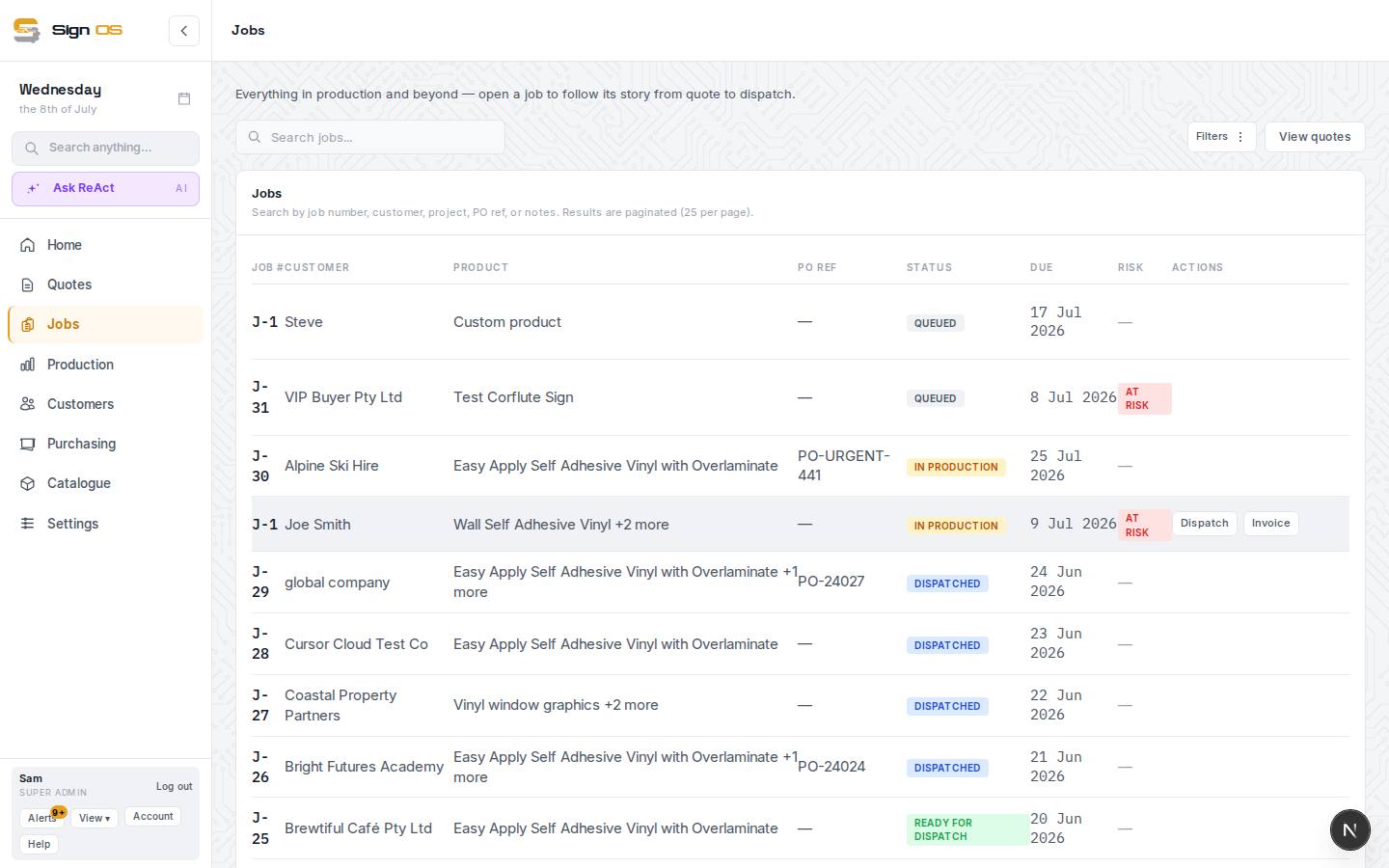
What is on this screen
Each part of the screen above, top to bottom, and what changing it affects.
Jobs list
- Search · All · At risk · Queued · In Progress · Completed · Dispatched · Cancelled · History
- Search by job number, customer, project, PO ref or notes, and pick which jobs to list. History shows only jobs brought across from your old system (they're on the other views too, badged, and read only); it's hidden if you have none.
- Job # · Customer · Title · PO ref · Status · Proof · Due · Client needs it by · Risk · Invoiced · Paid
- Job #, PO ref, Status, Due and Risk sort. Proof says where the artwork approval stands: Approved (with the date), 2 of 3 approved, Changes asked, Waiting or Not sent, blank when no proof has gone out. Risk is AT RISK when the schedule says it will be late; Invoiced shows the INV number; Paid the payment state: Paid, Deposit paid (only the deposit is in), Part paid or Unpaid. Which columns show is set under Appearance → Lists and screens.
- Dispatch · Invoice
- Row actions straight to the Outbound docket and the invoice page.
A job page
- Status strip
- Quote accepted (with the Q number) → Production (steps done of total) → Dispatch (due date) → Done.
- Job details card — Edit · Change
- Customer (links to their card), Contact (Change swaps it for this job), contact email and mobile, Quote total, Customer PO, Ships to, Items, Quote, Due date, Client required, Invoiced, Paid, Status, and Job owner. Edit opens the header for the PO, ship-to, due date, client required date, project name and status. Where your shop allows it, Put on hold holds the job with a reason.
- Margin → · Fulfilment →
- Quick links to the money and the dispatch side. Until the job is invoiced, the chip shows the quoted margin.
- Tabs — Details · Ordered · Approvals · Production · Dispatch · Purchasing · Accounts · Files
- Each part of the job. Which tabs you see depends on your access.
- Release to production · Job sheet · Materials · Prepress · Rework · More
- Beside the tabs. Release shows while the job is queued. More holds Print job sheet, the SWMS PDF and SWMS draft, Production board, View quote, Copy to new quote, Cancel job and Delete.
- Notes
- Typed notes that stay with the job, on every tab.
Step by step
- 1
Open Jobs in the sidebar. Search by job number, customer, project, PO reference or notes, and pick All, At risk, Queued, In Progress, Completed, Dispatched or Cancelled. Dispatch and Invoice on a row jump straight to those.
- 2
Read the columns: Status (in production, ready for dispatch, dispatched, completed), Due, Client needs it by, Risk (AT RISK when the schedule says it will be late), Invoiced and Paid.
- 3
Open a job. The strip at the top tells its story — quote accepted, production (steps done of total), dispatch, done — and the Job details card carries the customer, contact, quote total, customer PO, ship-to, due date, invoiced and paid state. Edit changes the header; Change swaps the contact for this job.
- 4
The tabs: Details (summary, project tasks, permits, correspondence, history), Ordered (what they bought), Approvals (artwork sign-off), Production (departments and steps), Dispatch (how it goes out, SWMS, manifest), Purchasing (materials and POs), Accounts (money) and Files. Beside them sit Job sheet, Materials, Prepress and Rework, and More for printing, the quote, copying, cancelling and deleting.
Tips & gotchas
- Every tab has the Notes box at the bottom. Typed notes stay with the job for good; the History on Details records everything anyone did.
- The job opens on the tab your shop chose under Settings → Team → Screens, so a production shop can land on Production every time.
- A job brought across from your old system is read only: you can open its job sheet and quote, and Copy to new quote, but not release, rework, cancel or delete it.
- With Settings → Production → Job sheets → Let jobs be put on hold on, Put on hold on Job details holds a job with a reason. It can't be released and its steps can't be started until it's taken off hold, and customers aren't chased about it meanwhile.