
Send supplier bills to your accounting
Filter, tick, and push a batch to Xero — or let it happen on its own.
What this is for
Someone in accounts should not have to open thirty purchase orders to get thirty bills into Xero. The bills board puts them all on one screen with the filters an accounts person actually thinks in, and sends a ticked batch across in one go.
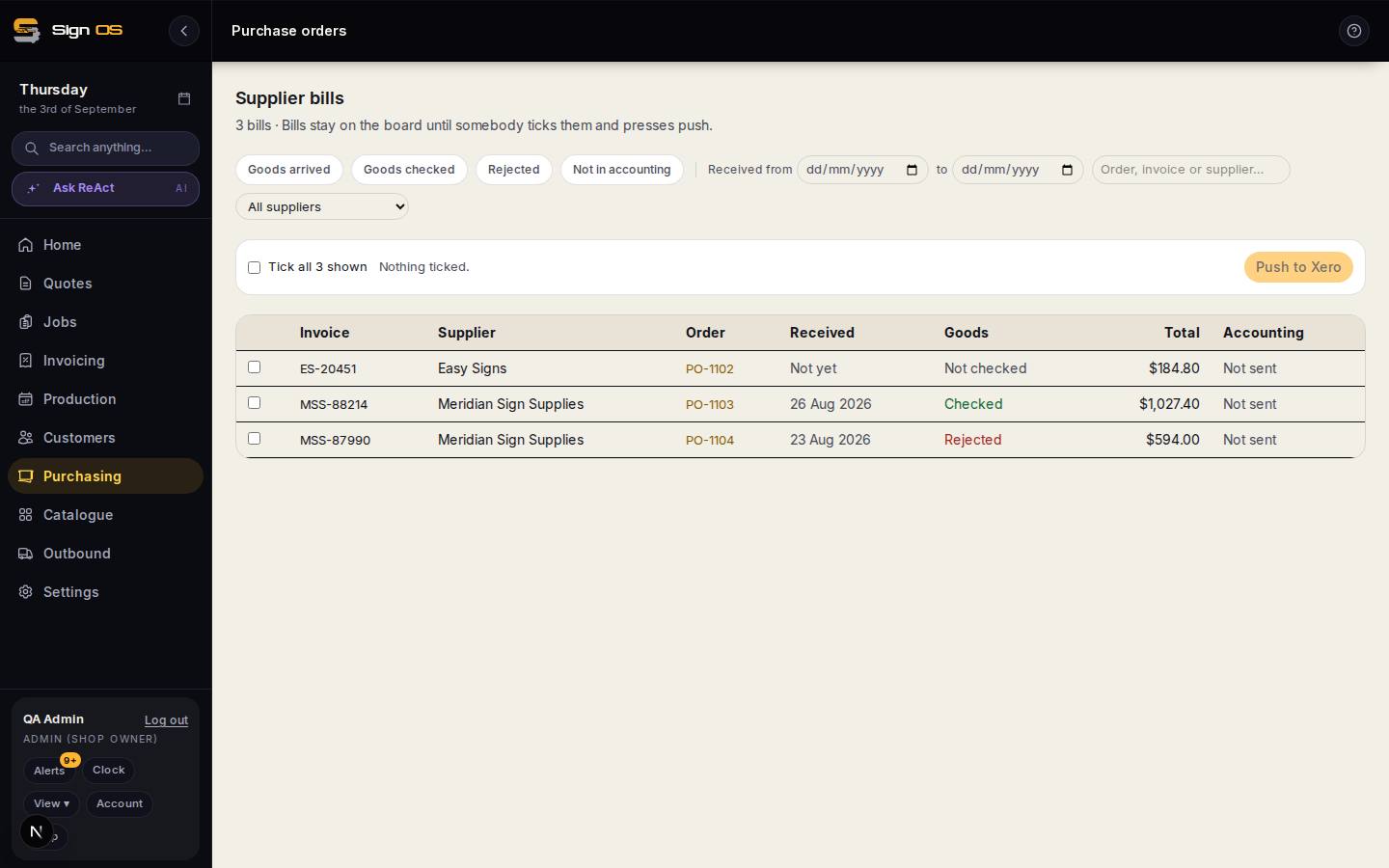
What is on this screen
Each part of the screen above, top to bottom, and what changing it affects.
Supplier bills board
- Goods arrived · Goods checked · Rejected · Not in accounting
- Filters on the receipt and check state and on whether the bill has been pushed.
- Received from … to · All suppliers · search
- Date range and supplier.
- Tick rows · Tick all shown · Push to Xero
- Bills stay on the board until somebody ticks them and pushes; each becomes a draft supplier bill in your accounting software.
- Invoice · Supplier · Order · Received · Goods · Total · Accounting
- The supplier's number, the PO, when it arrived, whether it was checked, the amount, and the accounting state (Sending or awaiting confirmation, In accounting, Failed).
- Automatic pushing (Purchasing settings)
- Never, once the goods have been checked, or as soon as the goods arrive.
Before you start
- Your accounting connection is set up under Settings → Connections → Accounting.
- The supplier invoices have been recorded against their orders.
Step by step
- 1
Open Purchasing → Supplier bills.
- 2
Filter to what you are working on — goods arrived, goods checked, rejected, not yet in accounting, a date range, a supplier, or a search.
- 3
Tick the rows you want, or tick everything the filter is showing.
- 4
Click Push to Xero. Each bill is created as a draft supplier bill.
- 5
For automatic pushing, open Purchasing → Purchasing settings and, under Sending supplier bills across, set when it should happen: never, once the goods have been checked, or as soon as the goods arrive.
Note: It starts off. A shop that has never thought about this should not find its ledger filling up on its own.
Tips & gotchas
- Bills always arrive in Xero as drafts, never approved. A machine should not approve a bill for payment.
- A rejected delivery is never pushed automatically, whatever the setting says.
- One failure does not lose the rest — push thirty and you get twenty-nine through with the one problem named, not an error page.
- Goods checked is the safer automatic setting: it waits until somebody has actually opened the boxes.