
Sign OS blog
Seamless Finances: How Sign OS Integrates with Xero and QuickBooks
· Updated

Every sign shop has the same finance ritual: the job wraps up, someone opens the accounting package, and re-types an invoice that already exists in the job system. It's ten minutes per invoice, it drifts out of sync the moment anything changes, and it's where typos become debtors.
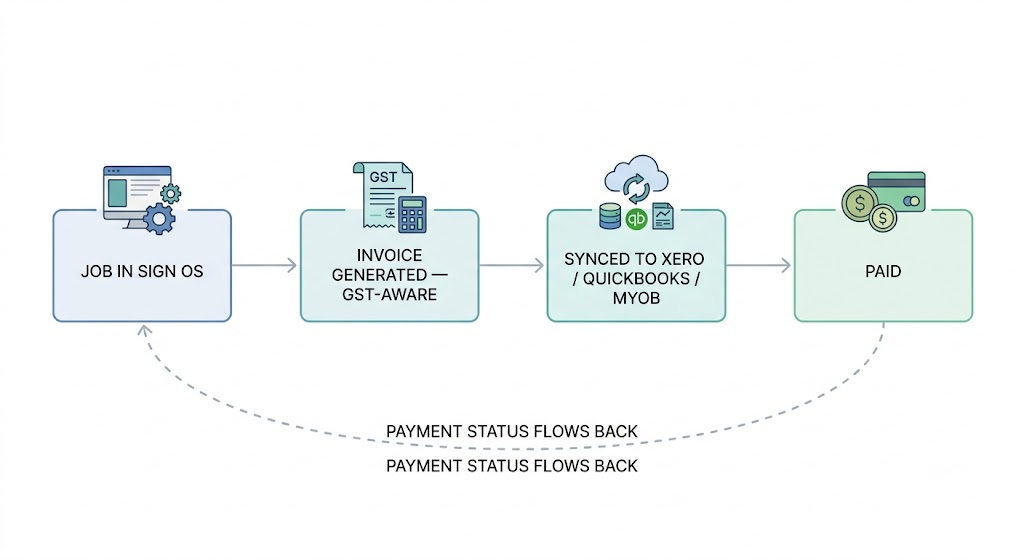
Sign OS ends the double entry. Invoices are generated from the job — deposit, progress, final — and sync to your accounting platform automatically. Payment status flows back, so the job's margin stays live without anyone reconciling by hand.
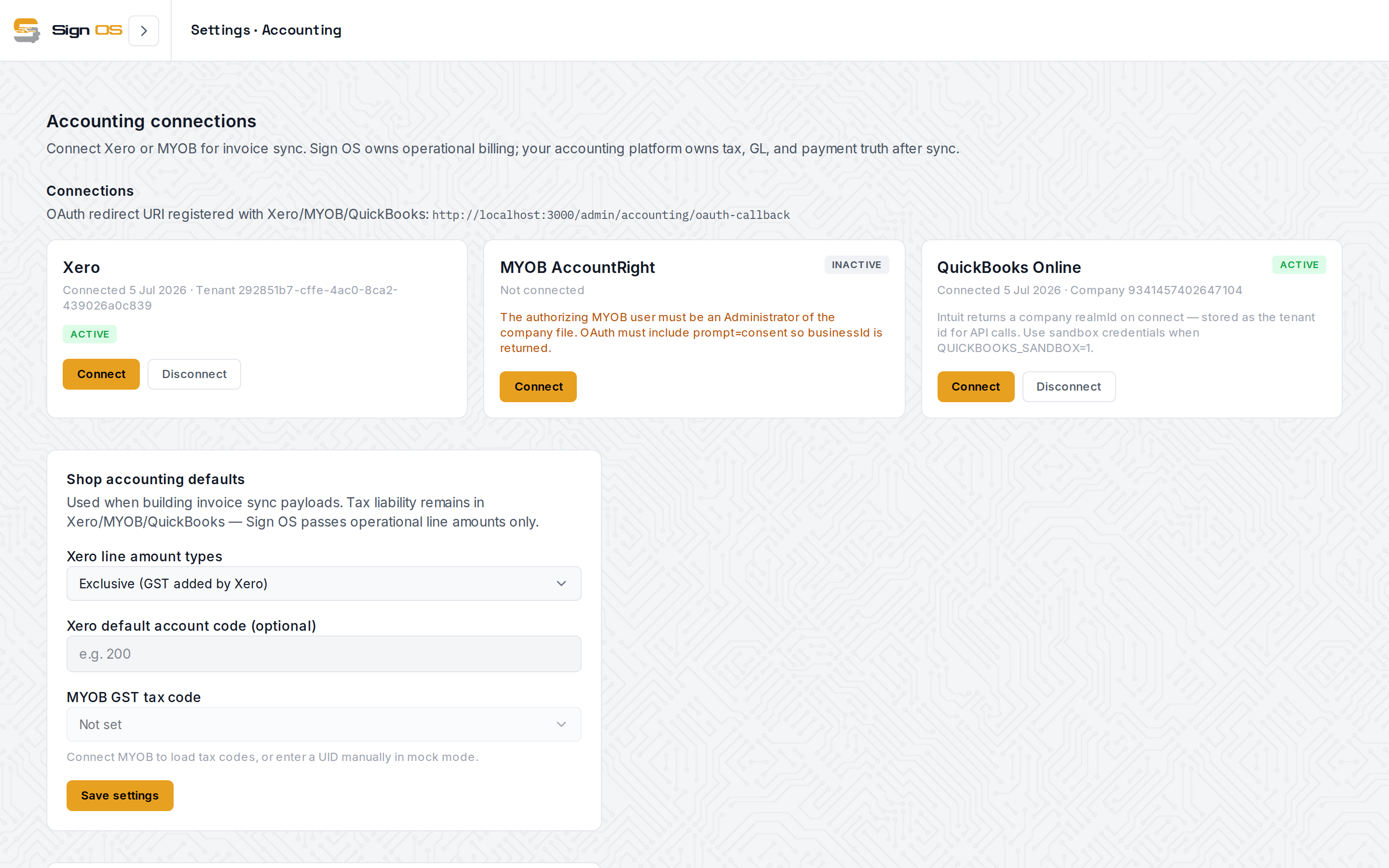
An honest status note up front, because we keep one on our own homepage: Xero and QuickBooks Online are both live in production today, two-way — invoices out, payment status back. MYOB AccountRight is not switched on yet. It's built and tested, and switched off for one reason: MYOB charges A$110 a month just for access to its developer API, for as long as a single shop is connected. It goes on once enough shops need it to cover that. Everything below describes how each connection works; two of the three you can use this afternoon.
Sign OS is not your general ledger — by design
The division of labour is deliberate. Sign OS is the operational source of truth: quotes, jobs, and the invoices they generate (standard, deposit, progress, supplementary and credit — all GST-aware). Your accounting platform stays the financial source of truth: the ledger, BAS, and payments. Your accountant keeps the system they know; your team stops re-keying into it.
How the sync actually works
When you generate an invoice in Sign OS against a connected platform, it enters a sync queue and a background worker takes over:
- Tokens refresh automatically. Each connection uses OAuth — you authorise once from the accounting settings page, and Sign OS manages token renewal from then on.
- The customer is matched or created. In Xero, Sign OS looks for the customer by name first, then by email where only one contact has that address, so two businesses sharing an accounts address don't land on each other's contact. A same-named contact with a different email is treated as a different business unless the email is on the same company domain. QuickBooks matches on email. If the customer isn't there yet, the contact is created with name, email and phone. If you turn on bill-to accounts, one customer can have several accounts to bill (an agency whose stickers and signboards are billed to different entities, say), each with its own contact in your accounting platform, and each job picks which one its invoices go to. No pre-mapping spreadsheets.
- The invoice is created with its number, customer reference and line items. Sync is idempotent — keyed on the invoice number — so a retry after a network hiccup can never create a duplicate.
- Status is tracked the whole way. Every invoice shows where it is — syncing, synced, paid — and if a sync fails, the error is stored against the invoice and retried, not silently dropped.
Payments flow back
Sending the invoice out is half the story; knowing it's been paid is the half that matters.
- Xero notifies Sign OS through signed webhooks the moment an invoice is settled — payment status lands in Sign OS in near real time, verified against the invoice balance.
- QuickBooks doesn't offer the same webhook model, so that connection polls for new customer payments and matches them back to their invoices automatically. (The MYOB connection is written the same way, for whenever it is switched on.)
Either way, the job record in Sign OS knows it's been paid — which is what keeps job-level margin reporting honest, since margin in Sign OS is calculated against invoiced totals.
Platform specifics
Xero. Invoices are created as sales invoices (ACCREC) with your choice of line amount treatment — tax exclusive, inclusive, or no tax — configured once in settings. Webhook signing keys are managed in the same place, so paid-status updates are authenticated end to end.
QuickBooks Online. Connects to your company file via Intuit's OAuth; invoices carry your Sign OS invoice number as the document number, and payment polling links payments to invoices through QuickBooks' own transaction references. API rate limits are respected automatically.
MYOB AccountRight — not switched on. The connection is written and tested on the same sync engine as the other two. It's built and tested, and switched off for one reason: MYOB charges A$110 a month just for access to its developer API, for as long as a single shop is connected. It goes on once enough shops need it to cover that. If you are on MYOB, tell us: . Until then, MYOB shops export from Sign OS and import to MYOB the way they do today.
The connections live on one screen in the admin accounting settings, each with its connection status, linked organisation and connected date.
What this looks like in a week of trading
Monday: a $14,000 shopfront job is accepted, and a 50% deposit invoice goes out from the job page — it's in Xero before the kettle boils, against the right contact, as a draft for your bookkeeper to approve (or approved straight away, if you've switched that on for invoices you've already emailed). Wednesday: the deposit is paid; Xero tells Sign OS, and the job's commercial view updates without anyone touching it. Friday: the job ships, the final invoice generates from the same job with nothing re-typed, and your bookkeeper finds a ledger that already matches production.
No CSV exports. No "which system is right?" Both are — because each one only owns what it's good at.
Sign OS is built and supported in Victoria, Australia — AUD plans, GST-aware invoicing end to end, and a free 30-day trial with no card required. Xero and QuickBooks sync are live today. MYOB is built and waiting on a decision about a bill, which is exactly how our status board puts it.