
Sign OS blog
Never Miss a Message: How Sign OS Logs Job Correspondence Automatically
· Updated

Every sign job is really a conversation: the enquiry, the artwork back-and-forth, the "can we move it a week," the approval, the delivery question. That conversation is scattered across two inboxes, someone's phone, and a memory of a call that happened on a Friday. When a dispute or a query lands months later, reconstructing it is archaeology.
Sign OS gathers a job's correspondence onto one timeline — most of it automatically. Here's what gets captured, and what still takes a human ten seconds.
Emails, captured without forwarding them one by one
We help you connect your mailbox first. Once configured, Sign OS captures job email through the routes set up for your shop:
- Every job has its own address. Send or forward anything to the job's address and it lands on that job, attachments included, with nobody filing it.
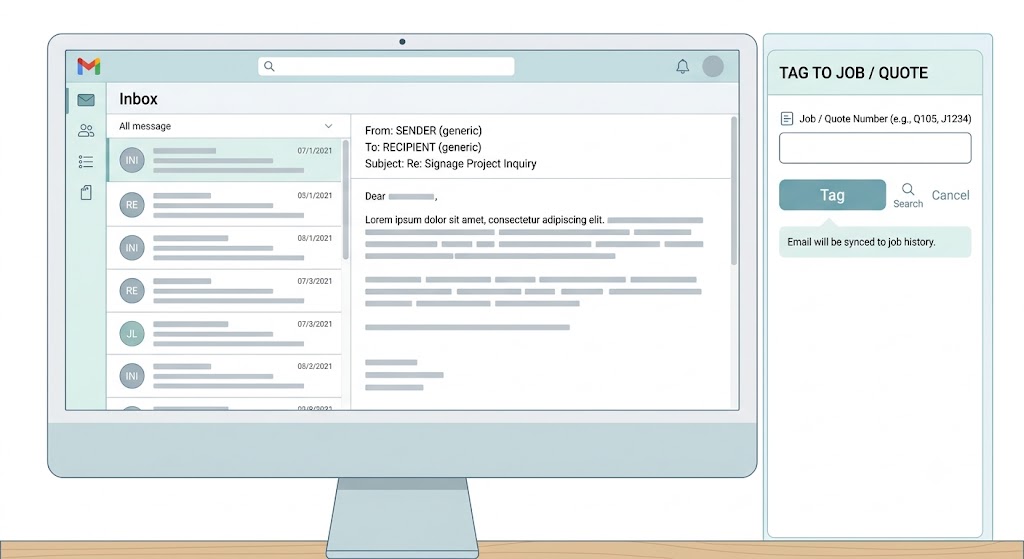
- Outlook and Gmail panels. A Sign OS panel in Outlook and in Gmail files the email you have open onto a job or quote, without switching apps. It only reads that one email; nothing reads your inbox in the background. The Gmail panel installs for the whole team from the Google Workspace Marketplace.
- Inbound addresses. Each shop gets inbound aliases — mail sent to a job's address (or with the job number in the subject) is routed to the right job on its own, and any attachments are saved straight into the job's files.
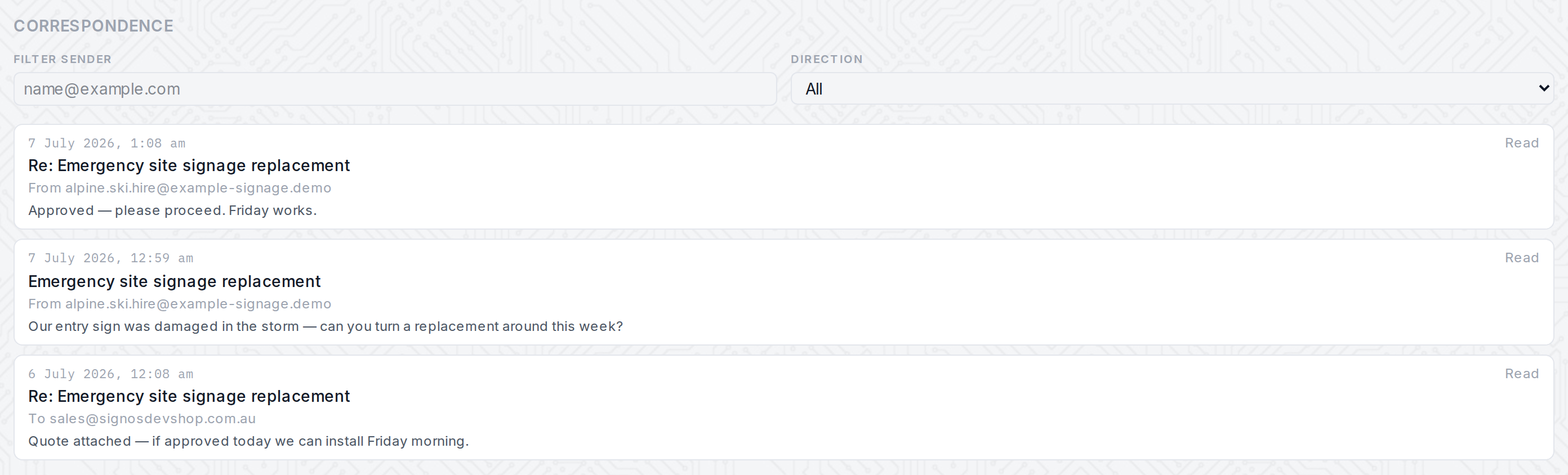
Captured emails are grouped into conversation threads and shown on the job's Correspondence tab with sender, direction (inbound or outbound), timestamp and full body. You can filter by sender or by direction, see who tagged each message and when, and deep-link back to open the original in Outlook or Gmail. Attachments sent to the job's address, or filed from Outlook with a connected mailbox, ride along into the job's files instead of being buried in someone's mailbox.
Every document you send is logged on its own
When you send a quote, invoice or purchase order out of Sign OS, the send itself is recorded automatically — who it went to, which document, whether it succeeded or failed, and when. So "did the quote actually go out?" stops being a guess. If a send fails, that's on the record too, not silently swallowed.
Calls and meetings, in ten seconds
Not every conversation is an email. The Log correspondence action lets anyone record a phone call or a meeting against the job — channel, subject, a note — and it lands on the same timeline, interleaved with the captured emails in date order. It's the one manual step, and it's deliberately small: the aim is that the phone call your estimator took at 4pm is on the job by 4:01, not lost by Monday.
Kept as long as you need, and no longer
Because it's structured data rather than a pile of forwarded mail, correspondence obeys a retention policy you set: how many days to keep tagged emails, and when to purge message bodies while keeping the metadata. You decide the balance between having the history and holding personal data, and Sign OS enforces it automatically.
What's automatic, and what isn't
Being straight about it, because the headline word is "automatically":
Automatic today — filing anything sent to a job's own address; filing an email onto the job it names when someone opens it in the Outlook or Gmail panel; routing inbound mail (and its attachments) to the right job; threading conversations; logging every document you send with its delivery status; enforcing retention.
Still a human step — logging phone calls and meetings (a quick manual note). Day-to-day replies mostly still happen in your own email client. On shops with ReAct, the job's Correspondence section can draft a customer email for you (a quote follow-up, proof request, status update or invoice reminder) from the job's own details; you edit it and click Send yourself, and it's logged on the same timeline. Attachment capture is already part of configured inbound filing. Ask us which Outlook or Gmail setup suits your shop before starting. Bring the mailbox address and an administrator who can approve access; we will confirm the connection, filing rules and attachment handling with you.
The net effect is the one that matters: months later, when someone asks what was agreed, you open the job and the conversation is there — the emails that flowed, the documents that went out, and the calls that got noted — on a single timeline instead of scattered across three inboxes and a memory.
Sign OS is built and supported in Victoria, Australia — Outlook and Gmail companions, configurable retention, and a free 30-day trial with no card required.