
Sign OS blog
From Gantt to Floor: How Sign OS Manages Sign Production from Start to Finish
· Updated
Most sign shops don't have a production system — they have a whiteboard, a group chat, and one person who carries the schedule around in their head. It works until it doesn't: a rush job lands, the whiteboard gets out of date by lunchtime, and the first anyone hears about a blown deadline is the customer chasing it.
Sign OS treats production as one continuous flow: the accepted quote becomes the job, Sign OS works out the plan, you steer it on the schedule, and the actual work runs on floor boards that update in real time. Here's how each stage actually works.
Quote to job in one click — prices frozen
Production starts before the floor ever sees the work. When a customer accepts a quote, Sign OS creates the job in one click: every line item is copied across as a job item with its pricing and specifications frozen at the moment of acceptance. Nothing is re-keyed, so production never runs off stale or edited numbers.
Each job item carries its production workflow with it. Products in Sign OS are built on process templates — reusable workflows like the steps to print, laminate, trim and pack a run of corflute signs. Each step in a template has a label, an assigned department, and an estimated time in minutes. When the job is created, those steps are snapshotted onto the job, so later edits to the template never disturb work already in progress.
Release to production: Sign OS works out the plan
Jobs waiting to go to the floor sit on the To release tab under Production. Releasing one checks it has a due date and process steps, then hands it to the planner.
The planner works the plan out from the work the job actually contains. Each step gets a latest safe start, worked back from the due date with the estimated minutes, department buffers and drying time (counted once, on that department's working days), and installs placed after the workshop work they depend on. Alongside that, Sign OS keeps a live forecast that books the work against each person's or department's real hours: your working days and hours, rosters, shut days and Australian public holidays, with running and finished work at the times it actually happened.
That's the difference between a schedule and a wish: the dates come from the minutes in the job and the hours your people actually have.
The schedule: one plan, three views, and you steer it
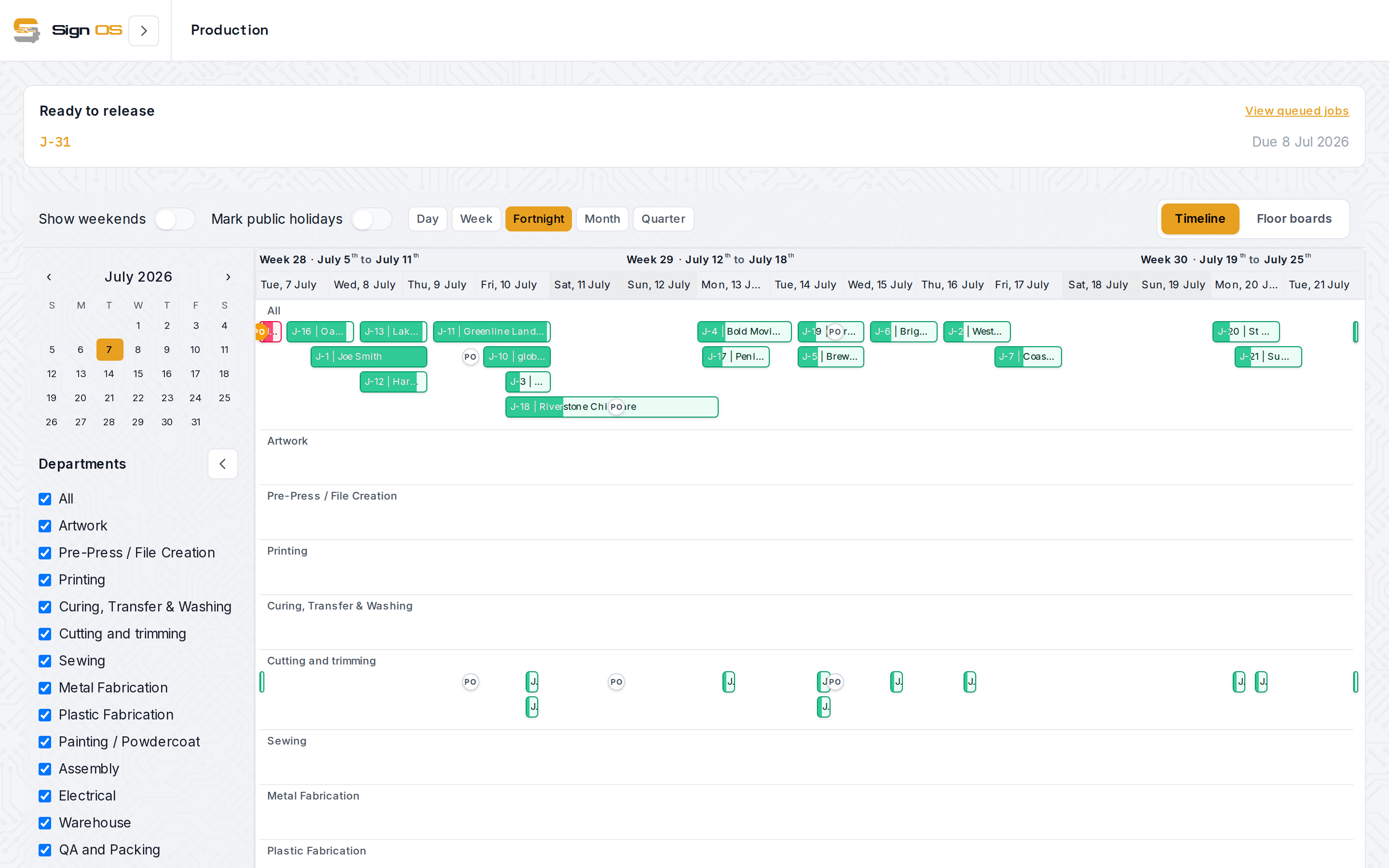
Production → Schedule shows that plan three ways:
- Timeline — every released job as a bar in department rows, by day, week, fortnight, month or quarter, with weekends hidden if you like and public holidays marked. Bars show progress, and are coloured by how the job is tracking: a job the plan has finishing after its due date shows red. Purchase orders raised against a job sit on its bar at their required-by dates, so a late delivery shows up on the work it will hold up.
- Week — each day's planned steps and booked hours, with a tray of waiting work beside it: jobs waiting for release, on hold, needing a time, and workshop tasks.
- People — the same week by person, so you can see who is loaded and who has room.
You steer it by dragging. Drop a card on a day and it's pinned there; drop it on a person and it's handed over; drag it back to the tray and Sign OS plans it again. While you drag, the preview shows where it lands, that day's load, what else moves because of it, and whether the due date or the customer's date gets missed. Every move, unpin and hand-over has Undo, and Sign OS asks why before a job is planned past the customer's date. Every date change is logged with who made it and why.
Above the schedule, capacity warnings flag departments that are overloaded or nearing capacity, and a day that's over-booked says by how much.
The floor: big buttons, live queue, no prices
Production staff don't work from a planner. They open Floor boards, which starts with one card per department showing three live counts: Ready, In progress and Done today. Tap your department and the board puts In progress and Ready to start up top, with the steps still waiting on something and today's finished work folded underneath. Each screen can be set to Computer, Tablet or Phone size, so the same board works on a desktop in the office, a tablet on the wall and a phone on site.
Each card is one production step on one job: the job number, the task, the customer, the estimated minutes, the due date, and when the planner has it starting and finishing. Ready is in the planner's order, urgent jobs first. Steps only become ready when the step before them is finished, and a waiting card says what it's waiting on and in which department. If the step before is still curing, the card says Still drying until the time the planner works out. A job put On hold on the planner says so, and why, and can't be started from the floor. A card reads Late when the planner's forecast has the job finishing after its due date, with the new finish time.
The buttons are deliberately simple: Start puts the step on you with the clock running, Pause and Resume cover a break or a job pulled off the machine, and Finish records the actual minutes, with a short Undo if you hit it too early. Cards move in real time as the team works, on every screen in the shop at once. Prices are never shown on the floor.
Every job sheet carries a QR code, so an operator can scan the job on the bench and update the step without navigating anywhere. And because every start and finish is logged with the operator and timestamp, you get a true record of actual time against estimate — which is exactly the data that makes your next quote sharper.
One system, one loop
The point isn't any single screen. It's that the quote, the schedule and the floor are the same data: the estimate that priced the job is the estimate that planned it, the plan you steer on the schedule is the order and the times on the floor board, and the minutes clocked on the floor flow back into the forecast and the job's margins. When production, sales and the front office are looking at the same truth, the whiteboard can finally retire.
Sign OS is built and supported in Victoria, Australia — AUD plans, GST-aware invoicing, and a free 30-day trial with no card required.