
How to price signs — a method your whole shop can repeat
Published 6 July 2026 · last reviewed 30 September 2026
Most sign pricing problems aren't maths problems — they're consistency problems. One person quotes from experience, another from a spreadsheet, and the same job leaves the shop at two different prices depending on who answered the phone. This guide lays out a repeatable costing method: materials with real waste, machine time, labour, overhead recovery and markup, with worked examples in AUD.
Start with what the job consumes, not what it looks like
Price from consumption and the price defends itself. A 2400 × 1200 ACM shopfront panel doesn't consume 2.88 m² of material — it consumes a whole 2440 × 1220 sheet unless the offcut is genuinely reusable in your shop. That distinction — billed usage versus theoretical area — is where most underquoting starts.
Work through each material the same way: what stock unit do you buy it in (sheet, roll, lineal metre), how much of that unit does this job consume once cutting layout and waste are considered, and what does that cost at today's supplier price — not the price from the last time someone updated the spreadsheet.
- Bill in supplier units: full or part sheets, roll metres, lineal metres
- Count waste honestly: skeleton, bleed, setup pieces, unusable offcuts
- Use current supplier prices — stale costs quietly eat margin
- Consumables count too: application tape, ink, laminate, fixings
Machine time is a real cost — give it a rate
Every machine in the shop has an hourly cost whether it's running or not: finance or depreciation, servicing, power, and the space it occupies. Divide realistic annual machine cost by realistic annual working hours and you get a machine rate. A wide-format printer might carry a very different rate to a CNC router — that's the point: jobs that hog the router should carry the router's cost.
Then split time into setup and run. Setup (file prep, material loading, tool changes) is roughly fixed per job; run time scales with quantity. Pricing both means short runs stop being accidentally cheap and long runs stop being accidentally expensive.
- Machine rate = annual machine cost ÷ realistic annual hours
- Setup time is per job; run time is per unit
- Quantity breaks should come from setup amortisation, not gut feel
Labour: charge the loaded rate, not the wage
A $35/hour employee doesn't cost $35 an hour. Superannuation, leave, workers' compensation and the unproductive hours in every week push the true cost well above the wage. A common approach: loaded cost = wage × (1 + on-costs) ÷ productive fraction. At 25% on-costs and 75% productive time, that $35 wage is a ~$58/hour cost before profit.
Different work commands different rates — design time, fabrication, and installation aren't interchangeable. Track them separately and quote them separately.
Overhead and markup — where the business gets paid
Rent, insurance, vehicles, software, quoting time you don't win — overhead must come back in the price. Shops recover it either inside their labour/machine rates or as a percentage on job cost; either works if it's consistent and reviewed yearly.
Markup then prices the value and risk, not just the cost. Tiering markup by job size is standard practice: small jobs carry high percentages because fixed effort dominates; large jobs can carry less and stay strongly profitable. Whatever your tiers are, write them down — markup by mood is how Friday-afternoon quotes lose money. Remember GST: quote and invoice with it stated clearly, and keep your costing ex-GST so margins read true.
- Recover overhead deliberately — in rates or as a loading, not by hope
- Tier markup by job size or value band, in writing
- Cost ex-GST; present GST clearly on the quote
- Review rates and tiers yearly — costs move, prices should follow
Worked example — a simple shopfront panel
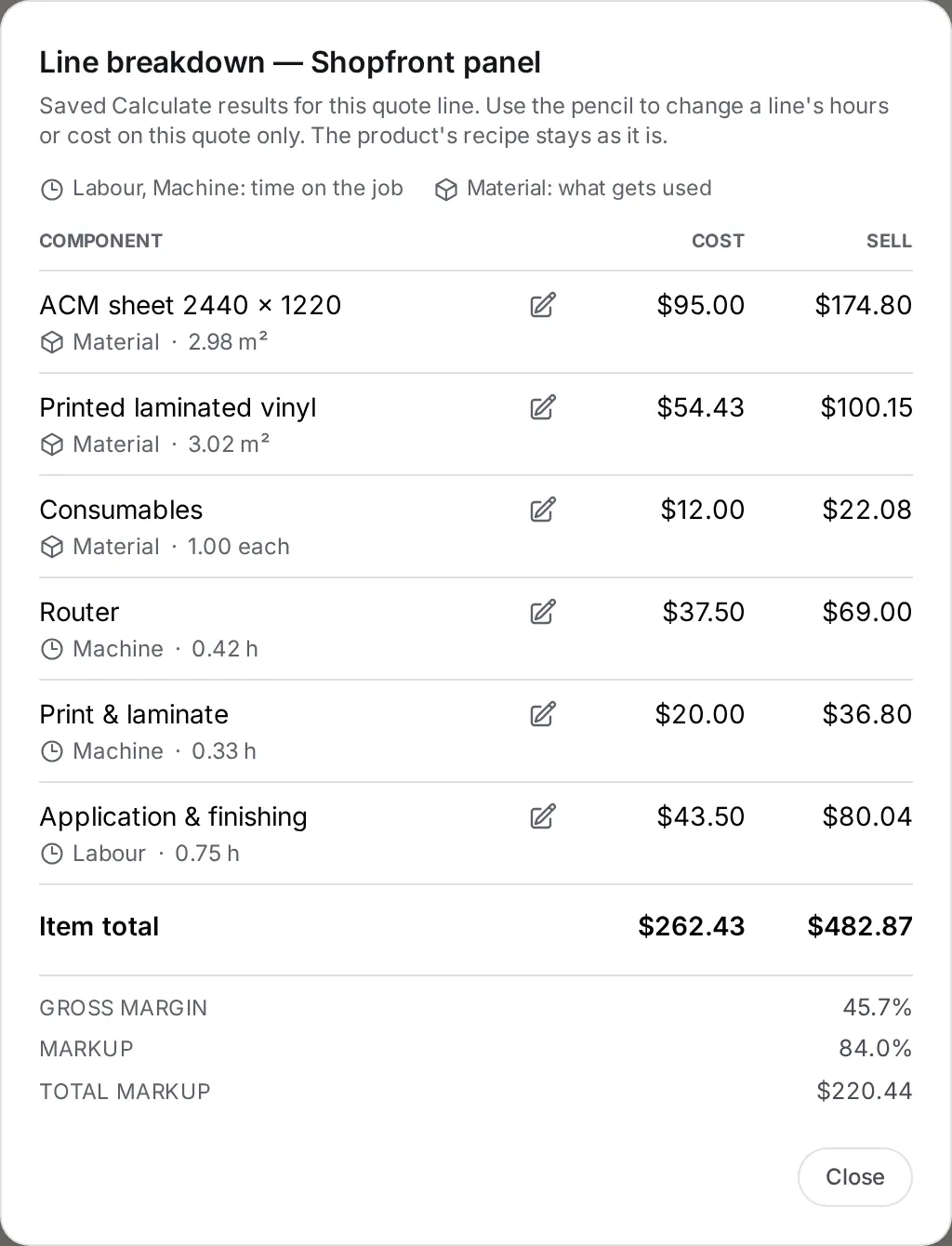
Here is one shopfront panel priced in Sign OS from example costs: a 2400 × 1200 printed ACM panel cut from a 2440 × 1220 sheet at $95, printed laminated vinyl at $18/m², $12 of consumables, a router at $90/hour (15 min setup + 10 min run), print and laminate at $60/hour (20 min), and application and finishing at a $58 loaded rate (45 min). The app charges the whole sheet, $95, because the panel uses all of it. It measures the vinyl from the sign — 2.88 m² plus 5% waste is 3.02 m², or $54.43 — then adds $12 of consumables, $37.50 of router time, $20 of print and laminate and $43.50 of labour. Job cost: $262.43. Sign OS puts one markup on cost, so the 15% overhead loading and 60% small-job markup become a single 84% (1.15 × 1.6 = 1.84). The panel sells for $482.87 + GST at a 45.7% gross margin, and every line of it can be explained to the customer if they ask.
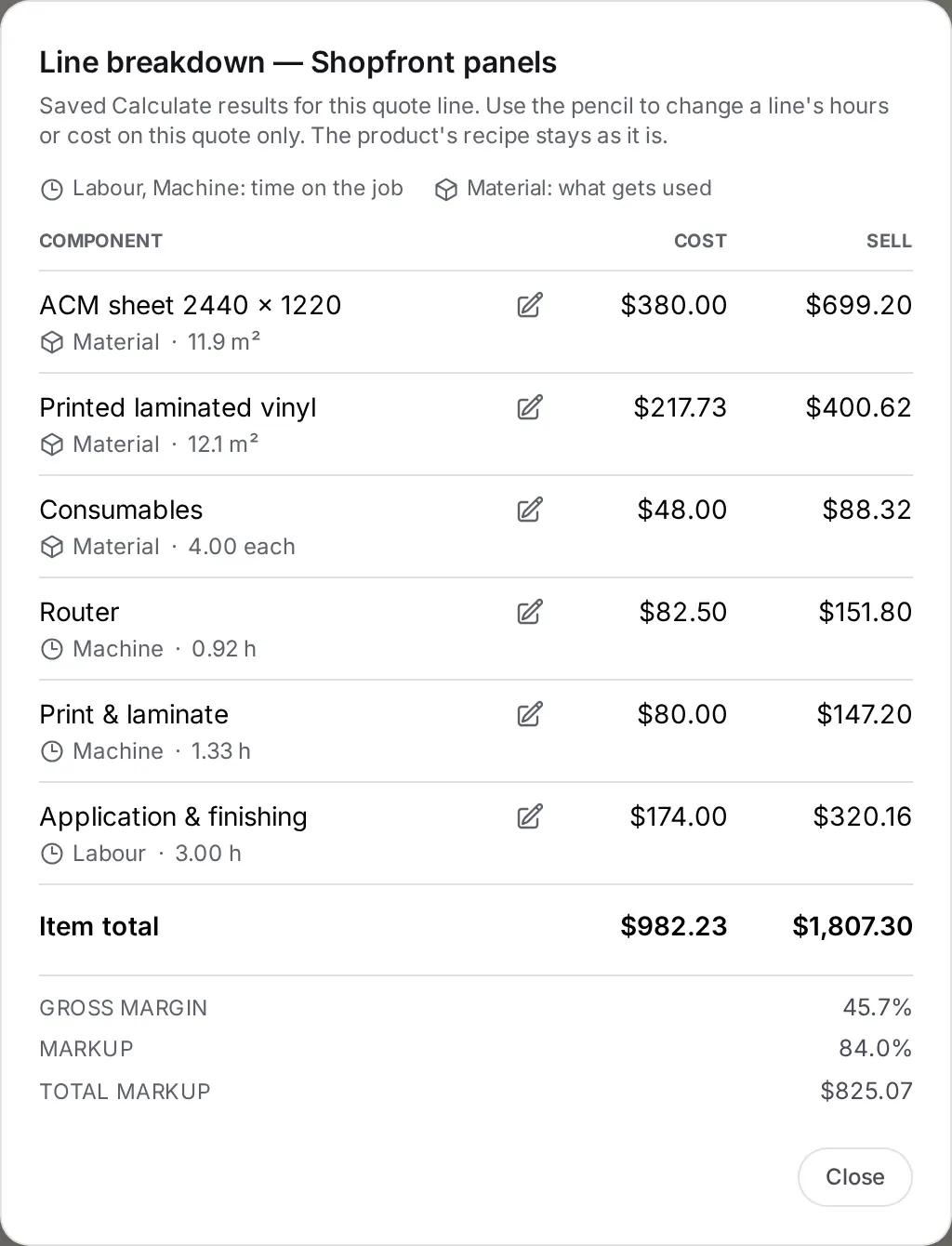
Quote four of the same panel and you can see where a real quantity break comes from. The router is set up once, not four times, so its time is 0.92 hours instead of 1.67 and the job saves $67.50 of cost. Nothing else is shared: a 2400 × 1200 panel fills a 2440 × 1220 sheet, so four panels still need four sheets. Four cost $982.23 and sell for $1,807.30 + GST, which is $451.83 a panel against $482.87 for one. A smaller panel that nests two or three to a sheet would share the board too — which is why a quantity break should come out of the recipe rather than a discount table.
Quantity 1
Quantity 4
The uncomfortable part isn't the arithmetic — it's doing this identically on every quote, at 4:55 pm on a Friday, with the customer on the phone. That's a systems problem, which is exactly why recipe-based quoting exists: encode the method once, and every quote after that follows it automatically. That's the approach Sign OS takes — but whether you use software or a laminated checklist, the method above is the fix.
Frequently asked questions
- Should I price by square metre?
- Square-metre rates are fine as a sanity check, dangerous as a method. They hide waste, setup time and quantity effects — the exact things that separate profitable jobs from losers. Cost from consumption (sheets, roll metres, machine minutes, labour), then compare against your historical $/m² to catch outliers.
- How do I handle rush jobs?
- Price the disruption, not just the job: a rush loading (commonly 25–50%) compensates for the jobs you displace and the overtime you risk. The important part is having the loading agreed and written down before the rush call comes in.
- What margin should a sign shop target?
- There's no universal number — it depends on your mix of supply-only versus supply-and-install, your local market and your overhead. The actionable discipline is knowing your quoted margin on every job and comparing it with actual margin after the job closes, so your recipes and rates improve every month.
- How does Sign OS relate to this method?
- Sign OS encodes this exact method as product recipes: materials with waste and yield, machine setup and run time, loaded labour rates and tiered markup. The calculation engine reprices any quantity or size deterministically, so every quote follows the method — whoever's quoting. There's a free 30-day trial if you want to test it against your current pricing.